
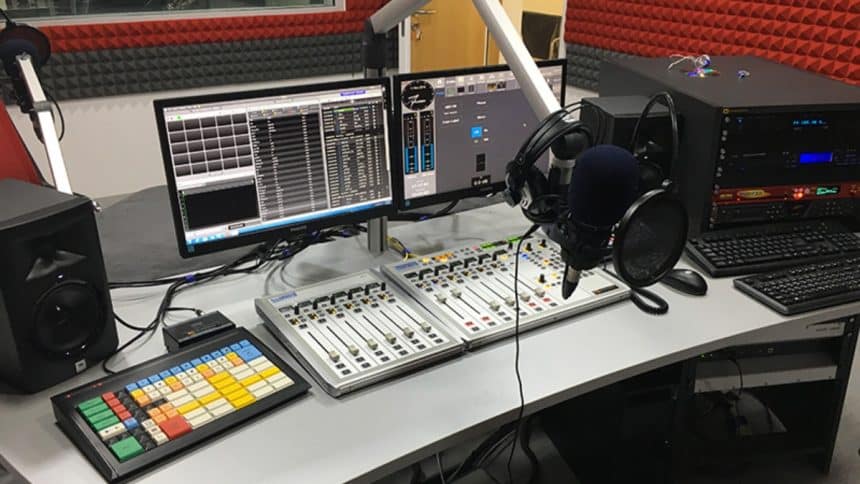
Setting up a home radio studio can be an exciting and fulfilling project for anyone passionate about broadcasting.
With advancements in technology, it’s now easier than ever to create a professional-sounding broadcast from the comfort of your own home.

In this blog, we will explore the essential steps to setting up a DIY home radio studio. Thus, it gives you the tools you need to bring your broadcasting dreams to life.
1. Finding the Perfect Location:
The first step in creating your home radio studio to be a online radio broadcaster is finding an ideal location for recording. Consider a quiet room with minimal outside noise that can be used exclusively for broadcasting. This will help ensure optimal sound quality and reduce distractions during recordings.
2. Acoustic Treatment:
Achieving good acoustics in your home radio studio is crucial for professional-quality audio. To optimize sound within your recording space, consider adding acoustic treatment materials such as foam panels or baffles on the walls. These materials absorb echoes and reflections, resulting in clear audio recordings.
3. Microphone Selection:
Selecting the right microphone is essential for capturing high-quality sounds during broadcasts. There are various types of microphones available on the market; however, dynamic microphones are generally recommended for beginners due to their versatility and durability. USB microphones are particularly convenient as they allow direct connection to your computer without the need for additional equipment.
4. Audio Interface and Mixer:
An audio interface serves as an important intermediary between your microphone(s) and computer or recording device. It converts analog signals from the microphone into digital signals that can be processed by recording software or streaming platforms.
Furthermore, many home setups benefit from having a mixer as well if you plan on incorporating additional audio sources or multiple microphones into your broadcasts.
5. Headphones:
Investing in a good pair of headphones is crucial when setting up a home radio studio. They enable you to monitor audio quality accurately in real-time during recordings and playback sessions. Closed-back headphones are recommended to minimize sound leakage and ensure a focused listening experience.
6. Recording Software:
Selecting the appropriate recording software is essential for managing and processing your audio recordings effectively. There are several options available, both free and paid, that offer features such as multi-track recording, editing capabilities, and various effects and plugins to enhance sound quality.
7. Broadcasting Platform:
Once you have recorded your broadcasts, you’ll need a way to share them with your audience. Streaming platforms like SoundCloud or Mixlr provide an accessible platform to broadcast live or upload pre-recorded shows. By exploring these options, you can find a platform that aligns with your broadcasting goals and suits your audience’s preferences.
8. Automation Tools:
To streamline your broadcasting process, consider using automation tools to schedule broadcasts or manage playlists without continuous manual intervention. These tools can save time while ensuring a consistent airing schedule for your shows.
9. Engaging Your Audience:
Building an engaged audience is key when running a radio show from home. Utilize social media platforms like Instagram, Twitter, and Facebook to share updates about upcoming episodes, interactive polls, behind-the-scenes content, and exclusive interviews with guests. Cultivating these connections will create loyal listeners who eagerly anticipate each episode.
10. Continual Learning:
Never stop learning! The world of broadcasting continuously evolves with technological advancements and changing listener preferences. Stay updated by attending webinars or online courses related to broadcasting techniques, improving audio production skills, or learning about emerging technologies that may enhance your broadcasts.
11. Creating a Comfortable and Functional Workspace:
Creating a comfortable workspace is essential for maximizing productivity and enjoyment in your home radio studio. Consider factors such as ergonomic furniture, proper lighting, and an organized setup that allows easy access to equipment and cables. A well-designed workspace will help you stay focused and ensure a seamless broadcasting experience.
12. Enhancing Audio Quality
Achieving high-quality audio is crucial for creating captivating broadcasts. In addition to investing in the right equipment, you can employ various techniques to enhance audio quality.
In addition to investing in the right equipment, employing various techniques such as proper microphone placement, soundproofing the recording space, utilizing pop filters, equalization, and noise reduction software can significantly enhance audio quality.
Moreover, ensuring a balanced mix and mastering process can further refine the sound, providing a professional touch to your broadcasts.
Conclusion:
Setting up a DIY home radio studio gives enthusiastic broadcasters the opportunity to share their passion effortlessly.
With careful planning and investing in essential equipment such as microphones, headphones, audio interfaces, mixer(s), recording software, and utilizing suitable broadcasting platforms, you can achieve professional-quality broadcasts from the comfort of your own home.











