
Over the years, PDF has solidified its position as an interchangeable format. It has made it simple for users to share files without affecting the document’s original format. You must edit, customize, or modify a PDF document multiple times. And for this, you must have an online pdf editor on hand.
This post will present you to Wondershare HiPDF, my go-to online PDF editor.
The online PDF editor Wondershare HiPDF provides various PDF tools, such as a PDF compressor, PDF merger, PDF converter, etc. Because Wondershare HiPDF is a web-based application, you can use it from any location anytime. Wondershare HiPDF aims to make hassle-free and straightforward PDF editing possible. Thanks to its simple user interface and user-friendly software, users won’t have any problems using the tool. Additionally, it offers a variety of helpful features, including batch processing.
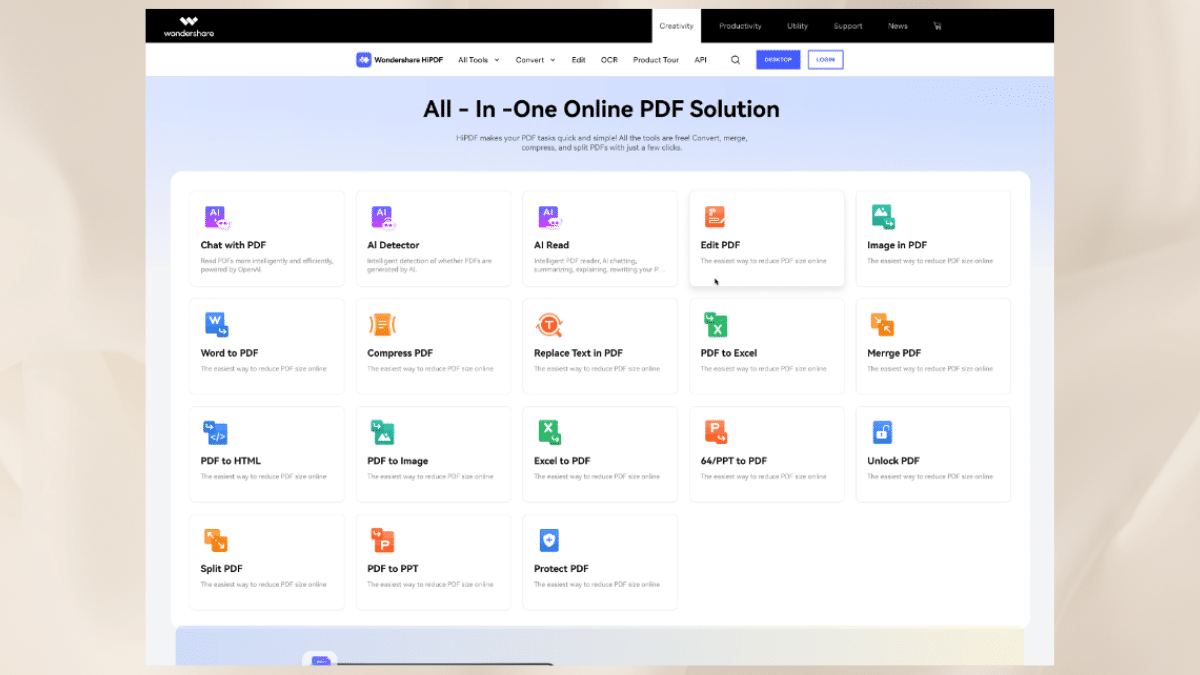
1. Features of Wondershare HiPDF
Following are the features of Wondershare HiPDF.
i. AI tools
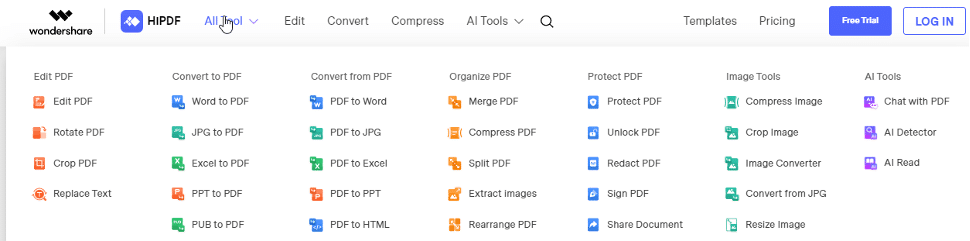
With Wondershare HiPDF AI tools, you can:
Chat with PDF: Wondershare HiPDF is changing how you work with PDFs. Your essays, reports, and textbooks all allow for free interaction. You can automate the process of analyzing PDF documents using artificial intelligence technology. Say hello to simple, adequate document comprehension.
AI Detector: The AI detector in Wondershare HiPDF allows you to determine intelligently whether AI produces PDFs. You can speed up the content review process, spot computer-generated text, and confirm the validity of the work.
AI Read: For a transformative PDF experience, you can ask questions, summarize, rewrite, and explain content in PDFs. Utilizing AI’s power to automate PDF document analysis will allow quick and easy document comprehension.
ii. Editing capabilities
You can add and edit texts, shapes, and images in your PDF file using the free Wondershare HiPDF editor.
iii. Conversion tools
HiPDF provides tools to convert PDFs to Word, Excel, PowerPoint, Images, HTML, PPT, PNG, and JPG because it is well-known that converting PDFs to other formats is the most crucial task for any PDF software. Additionally, it has tools to convert most of these formats to PDF. Using the drag-and-drop feature, you can quickly convert one or more files at once.
2. Benefits of Using Wondershare HiPDF
- Convenience of online editing on any internet-connected device.
- Conveniently edit multiple PDFs at once
- Using a single platform, convert to PDF and from PDF.
- A permanent deletion occurs within 60 minutes of conversion, so files are secure.
- Time-saving features
- Its user interface is simple to use and suitable for beginners.
- Real-time document editing and sharing improve collaboration.
- Tools to crop, resize, compress, and rotate images.
3. How to Use Wondershare HiPDF?
Wondershare HiPDF is a comprehensive online PDF editorthat offers robust tools for editing, reviewing, protecting, signing, and converting PDFs. It works as a powerful and practical online PDF editor and converter on Windows, Mac, and mobile platforms. It significantly increases document productivity!
HiPDF offers a wide range of features to manage PDF documents, which is something I like. I’ll discuss the most helpful and widely used PDF management options in the following.
i. Convert PDF
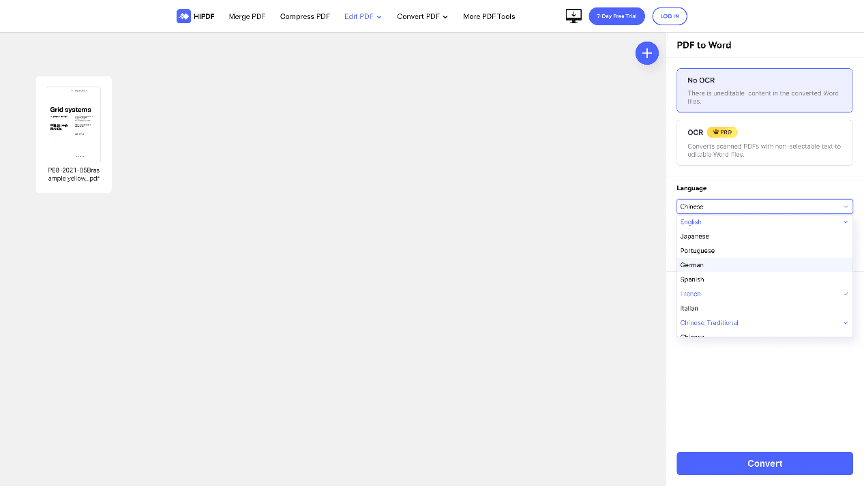
Follow these steps to use pdf to word converter online:
Step 01. Upload PDF files
Upload the PDF file using the online PDF to Word converter. Once the scanned file has been uploaded, the OCR is turned on. The conversion will begin with HiPDF.
Step 02. Download PDF
Once the conversion process is complete, you can select “download.”
2. Compress PDF
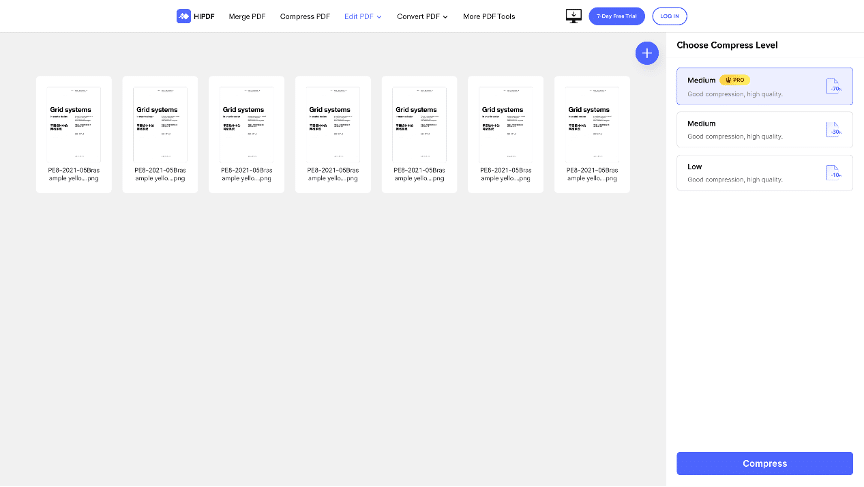
Step 01. Choose PDF files
Pick which PDF files you want to upload.
Step 2: Compress PDF
Then click “Compress” after selecting your preferred compression level.
Step 3: Download PDF
Download your compressed file once it has finished.
3. Merge PDF
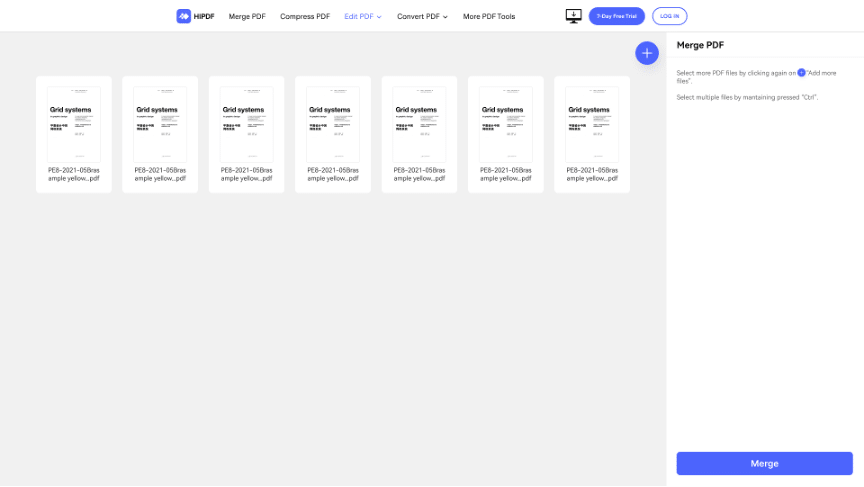
Step 01. Choose your PDF
Use the HiPDF cutter to upload the PDF file you wish to merge.
Step 2: merge PDF
After uploading, pick some page ranges. Afterward, click the “merge” button.
Step 3: Download merge PDF.
Wait for the PDF merged. After that, click “Download” to export your separated PDF files.
4. Edit PDF
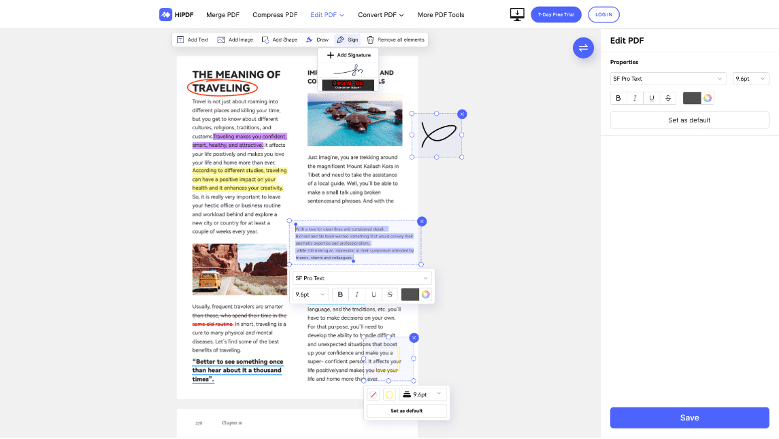
Step 01. Upload PDF files
Upload or drop the PDF files into HiPDF.
Step 02. Edit and annotate PDF
Edit your document after uploading it if necessary. Use the Text or Image Shape buttons, for instance, or include a signature.
step 03. Download edited PDF
The “Apply” button will allow you to save your changes. Wait, and then download your edited PDF files.
5. Crop PDF
Step 01. Upload PDF files
Upload the PDF file to the best PDF Cropper and wait for the upload to complete.
Step 02. Crop PDF
Choose an area and press Crop.
Step 03. Download Cropped PDF
Press Download to get Cropped PDF.
6. PDF Security
Step 01. Upload PDF files online
To use the HiPDF Protect tool, upload a PDF file online.
Step 02. Add password to PDF online
Wait for file extraction to finish. For your PDF file, enter a password with 6 to 20 characters.
Step 03. Save the secured file
To download the encrypted file, select the “Download” button.
Conclusion
When you frequently work with PDF files, investing in a dependable and feature-rich PDF tool is a good idea. I prefer online PDF editors to have to install an app on my desktop, and I use Wondershare HiPDF for that.
Wondershare HiPDF includes many features that you would expect from an excellent online PDF editor. It’s also free and doesn’t require registration, so you can work on your PDF documents whenever and wherever you want. Give Wondershare HiPDF a shot and see for yourself how powerful it is.











