
There’s nothing better than listening to your favorite singles from YouTube on your way home after work. But if you are on a subway, the network connection may not be good enough to stream a song. You may need to turn to a YouTube downloader to save those singles in case someday you go to a place without a signal or the YouTube clips are taken down.
If you are looking for a safe way to convert hit singles from YouTube without spending a dollar, VidPaw YouTube Converter is a free solution to download YouTube videos or audios. Here’s how.
Step by Step to Convert Hit Singles from YouTube to MP4 Online
If you prefer to avoid installing software, then VidPaw should be a convenient tool that helps you convert songs from YouTube to MP4 or MP3.
STEP 1. Copy the URL of your favorite hit single from YouTube.
STEP 2. Head over the VidPaw YouTube Converter site, and paste the URL into the download bar.
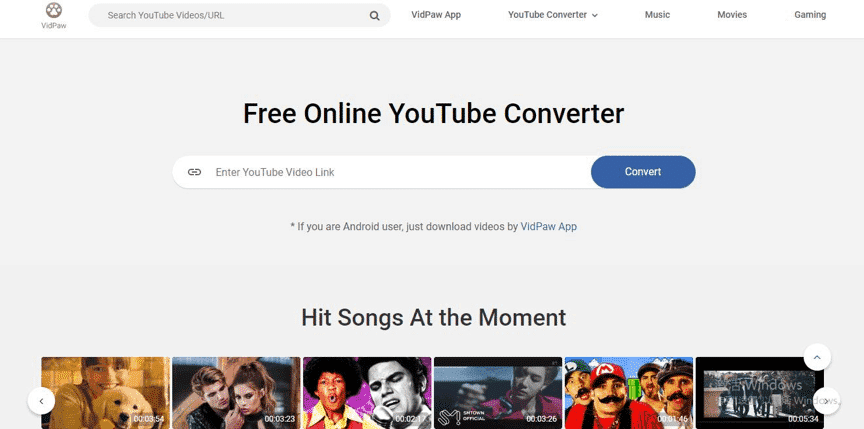
STEP 3. VidPaw will automatically detect the address and offer you lots of options for video/audio quality and format. Then choose MP4 from the list of supported formats.

STEP 4. Hit “Download”, and VidPaw will save your desired audio/video file in your download folder.
Simple Tip:
Besides, you can download YouTube videos by changing the YouTube video URL.
STEP 1. Find your preferred YouTube video, then add “paw” after the word “youtube” in the address field.
For instance,

STEP 2. Press the “Enter” key, and you will access VidPaw’s download page.
STEP 3. Choose your optimum format and quality, then click on the “Download” button. The YouTube video will be converted to MP4 very soon.
The Best Free App for Downloading YouTube Videos on Android
Just like VidPaw’s online version, VidPaw App offers a free service that people often pay for. In other words, VidPaw App for Android enables you to download or convert YouTube videos for absolutely free! Simply copy and paste a YouTube address into the app, and watch as the YouTube video lands on your Android devices.

Features on VidPaw App
Provide Multiple Formats and Quality
When I tested out VidPaw App, I discovered that VidPaw as a YouTube to MP4 converter is capable of downloading YouTube videos to common formats including MP4, MP3, M4A, and WEBM, and can download YouTube videos in 1080p. It even can download YouTube 8K HD videos if the source file is available in 8K resolution.
Download Online Videos From Over 1,000 Sites
In addition to downloading YouTube videos/audios to MP4 or MP3, you can download online videos on different popular video sharing sites such as Facebook, Instagram, Vimeo, DailyMotion, and Twitter. Paste the URL to VidPaw, and it will present you the download link within seconds.
Search and Stream YouTube Videos on VidPaw App
Another great feature of VidPaw App is that the app sorts YouTube videos according to trending and categories like music and movies. It is also equipped with a search engine so that you can search your favorite YouTube videos by entering keywords. You can even tap to stream and watch the YouTube video you like.
Conclusion
You may have reasons to save YouTube videos. Downloading them is not as difficult as you assumed. And now you may fully know how to convert YouTube videos to MP4. Try using VidPaw to save online videos to MP4 and MP3 and play them on your phone or another devices. And VidPaw’s huge array of features are presented in a clear interface which will have you easily downloading and converting any YouTube clips within seconds. More convenient features are waiting for you to explore.











