
If you want to listen to YouTube videos offline with your Mac, a good option is to convert YouTube videos to MP3 format. With the appropriate tools, this process is quick and easy. In this article, we review the best ways to convert YouTube to MP3, from software to online converters. From a reliable downloader for batch downloading videos to a quick solution that needs no installation, we have it all. It’s one of the best ways to save YouTube videos as MP3s on Mac easily by reading this post.
Why Convert YouTube to MP3 on Mac?
Converting your favorite YouTube videos to MP3 is a smart thing to do on a Mac so that you can access them easily without needing the internet. What if you could listen to music, podcasts, or interviews without buffering or ads? With an MP3 file, you can save high-quality audio on a Mac as well as any device to play music anytime, anywhere, whether offline or on the go. MP3 files are very convenient and flexible, making them a great option for anyone who loves YouTube content but wants to enjoy it without having to deal with it. These are the top reasons why you should easily convert YouTube to MP3 on Mac!
- Offline Listening: Listen to your favorite content without needing an internet connection.
- No Ads or Interruptions: Skip ads and enjoy uninterrupted audio.
- Universal Compatibility: MP3s work on virtually any device, from Mac to smartphones.
- Compact Storage: MP3 files are smaller in size, allowing you to store more content without using up too much space.
- High-Quality Audio: You can download MP3s at up to 320kbps for clear, detailed sound.
- Playlist Downloads: Download entire playlists or channels with just one click for quick access to your content.
Best YouTube to MP3 Converter for Mac Recommended
When it comes to converting YouTube videos to MP3 on your Mac, AudiConv Music Converter is one of the best tools available. It is easy to use and quickly changes music from many sites into over 100 formats like MP3, FLAC, WAV, AAC, AIFF, or ALC. You can convert one song or download whole playlists at once with the batch downloading feature.AudiConv has a simple design and strong features.
It works with more than 10,000 popular sites like YouTube, Spotify, Facebook, Instagram, SoundCloud, and TikTok, so you can easily get audio from almost anywhere. You can turn your favorite videos into high-quality MP3 files, up to 320kbps, so you can listen offline without losing sound quality. Also, it will keep your songs’ ID3 tags intact. The best thing is that the AudiConv Music Converter is very fast, up to 10 times quicker than other converters, and you can download many songs or videos at once with just one click.
Key Features of AudiConv Music Converter:
- Supports 10,000+ sites, including YouTube, Spotify, SoundCloud, and more
- Convert YouTube video to MP3, WAV, FLAC, MP4, and others
- High-quality MP3 conversion up to 320kbps
- Download entire playlists and albums with one click
- 10X faster download speed compared to other converters
- Retains ID3 tags like song title, artist, and album
How to Download YouTube Video to MP3 320kbps on MacBook?
Step 1: Download and install Audiconv on your MacBook.
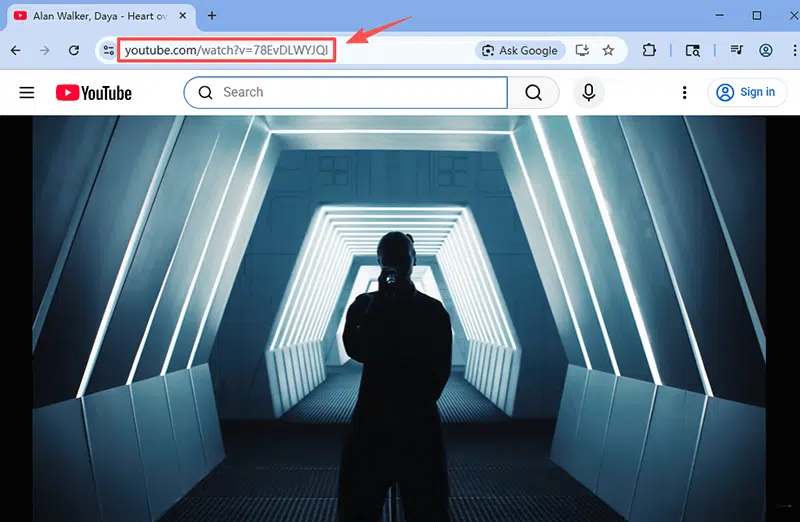
Step 2: Go to youtube.com, search for the video you want to download, and copy the video URL from the address bar.
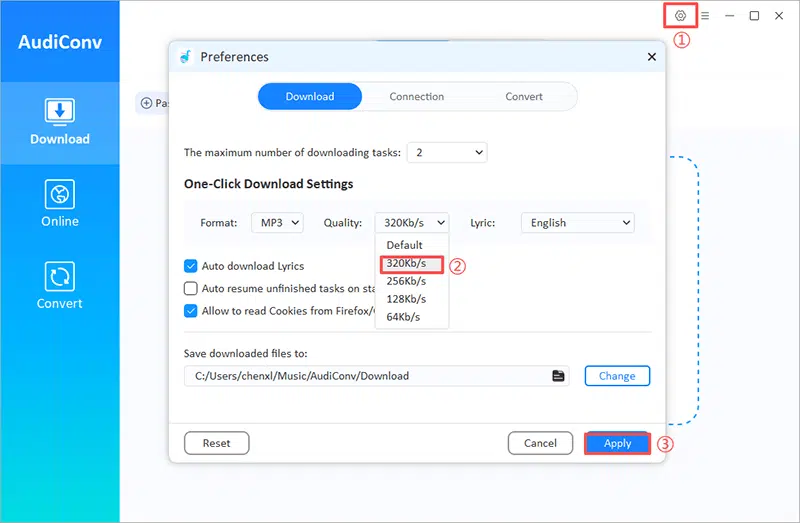
Step 3: Next, open Audiconv and set the output format to MP3 and select the audio quality (320kbps).
Step 4: Click on “Paste URL” to start the download process automatically.
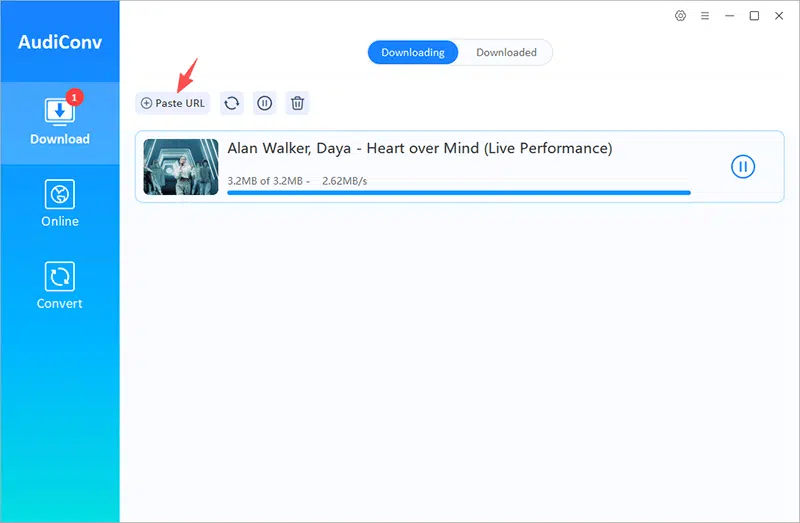
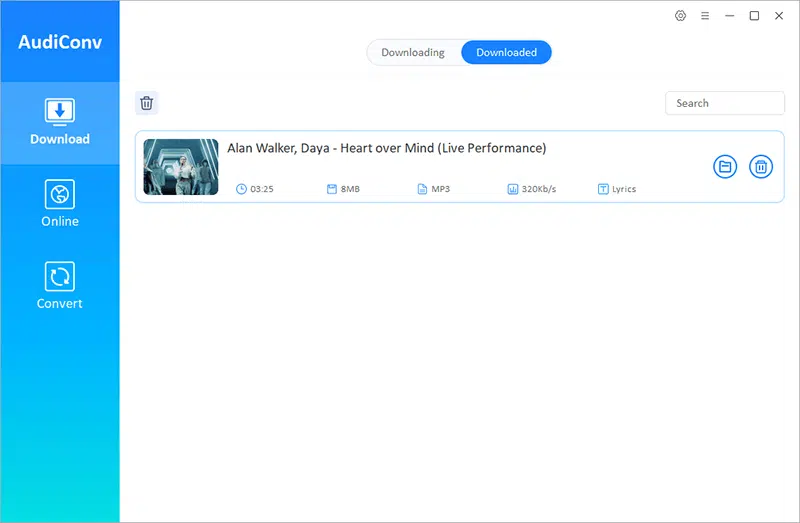
Step 5: Once the download is complete, find your MP3 file in the “Downloaded” section.
How to Convert YouTube to MP3 Online for Mac
If you prefer not to install any software, Y2Mate is an excellent online tool for converting YouTube videos to MP3. This tool allows you to easily convert YouTube videos directly from your browser, without needing to download or install anything. With Y2Mate, you can convert videos to MP3 in various qualities, including up to 320kbps for the best audio experience. The website is simple to use and works quickly, making it a great option for anyone looking for a hassle-free solution to download MP3s from YouTube on a Mac.
How to Convert YouTube to MP3 Using Y2Mate?
Step 1: Go to the Y2Mate website on your Mac.
Step 2: Go to YouTube and copy the URL of the video you want to convert.
Step 3: Paste the copied YouTube URL into the Y2Mate search bar.
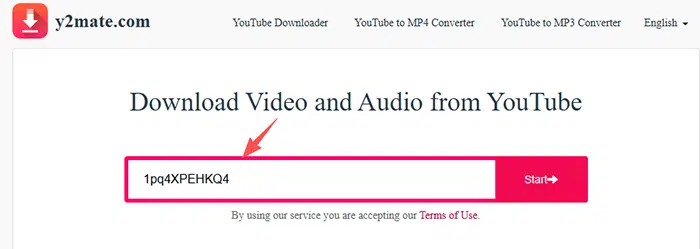
Step 4: Select MP3 as the format and choose your desired audio quality (up to 320kbps).
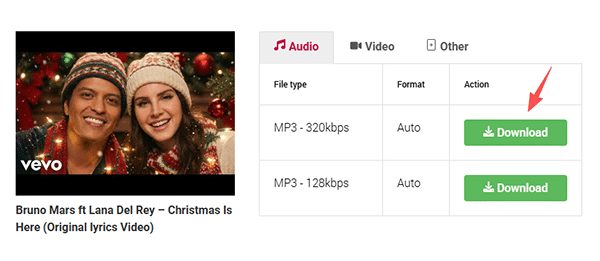
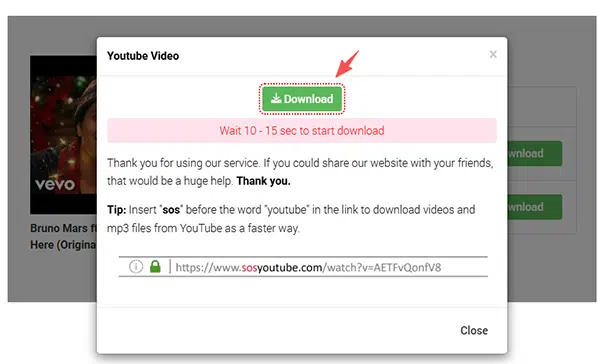
Step 5: Click the “Download” button to start the conversion.
Step 6: Once the conversion is finished, click the “Download” button again to save the MP3 file to your Mac.
How to Convert YouTube to MP3 on Mac via VLC
VLC Media Player is a powerful, free tool that can do more than just play media files; it can also convert YouTube videos to MP3 format. Although it requires a few extra steps compared to other converters, VLC is a great all-in-one solution for those who already use it for video and audio playback. The best thing is that it’s completely free, and it works directly on your Mac without additional software.
How to Convert YouTube to MP3 Using VLC?
Step 1: Download and install VLC from the official website if you haven’t already.
Step 2: Go to YouTube and copy the URL of the video you want to convert.
Step 3: Open VLC Media Player on your Mac.
Step 4: Click on File in the top menu and select Open Network Stream.
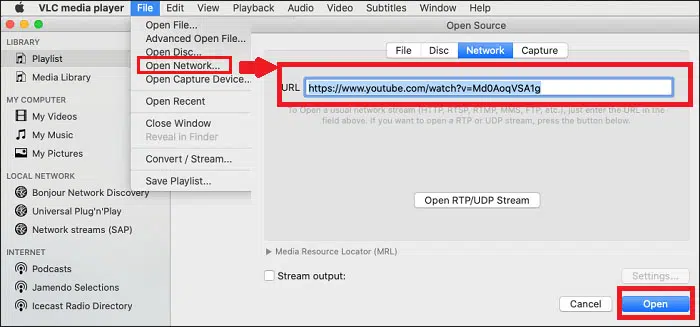
Step 5: Paste the YouTube URL into the network URL box and click Open.
Step 6: While the video is playing, go to File > Convert/Stream.
Step 7: In the conversion window, select Audio – MP3 as the output format.
Step 8: Choose your destination folder and name the MP3 file.
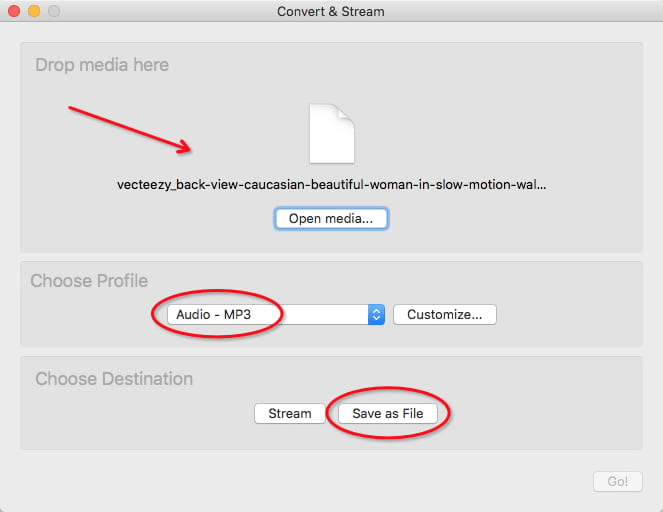
Step 9: Click Save to begin the conversion.
Step 10: Once the conversion is complete, the MP3 file will be saved in your chosen folder, ready for offline use.
Conclusion
In this article, we talk about different ways to change YouTube videos to MP3 files on your Mac. We mention online tools like Y2Mate and VLC Media Player. Y2Mate is fast and simple, and VLC is a good all-in-one option, but AudiConv Music Converter is the best choice. It works well for downloading many files at once, makes high-quality MP3s (up to 320kbps), and does this very quickly. Whether you need one song or a whole playlist, AudiConv Music Converter gives you the best mix of easy use, speed, and sound quality. For the best experience in changing YouTube videos to MP3, AudiConv Music Converter is the top tool to use.











