
Have you lost your cherished data from digital devices but don’t know how to recover it? Don’t panic because, in this article, we will introduce an innovative tool that will help you.
Accidental deletion of data is a thing to happen in everyone’s life. No matter if you lost data from software corruption or unintentional physical damage, you always wish to get your lost data back to its original quality. Luckily, you are living in a content-driven world where you can find solutions to every problem.

You can now recover data from SD cards or any other storage device in lossless quality. The best-in-class data recovery tool through which you can accomplish this task is Wondershare Recoverit. This article will guide you about this tool to a further extent.
What Not to Do When Confronted with Data Loss
There are a few considerable things that you need to stop after losing data. These things can save you from further irritable scenarios. Do you wish to know what to avoid in such scenarios? Some of the things which you need to avoid are:
- Usage of Affected Devices: Stop using the affected devices before anything else. If you continue using the affected devices, it will overwrite your data and make recovery more complex.
- Attempting Unauthorized Data Recovery Methods: Several DIY channels claim to be the best regarding data recovery, yet it’s not true. If you try unauthorized DIY methods, then it can worsen your situation.
- Messing with Storage Device: Not every person can fix the storage devices magically; that is why you need to consult a specialist. You should never open the storage devices by yourself. It can cause unrecoverable damage to delicate devices.
- Formatting Storage Devices: This is quite a common mistake to happen when someone loses their essential data. Users think they can never recover the data and format the whole device. However, this erases the existing data structure and algorithms from the device.
Protecting Your Data: Essential Practices to Prevent Unintentional Permanent Data Loss
Even in this digital age, data recovery can be a challenging procedure. Yet, some practices are quite beneficial for avoiding permanent data loss issues. Jump below to get into the reliable data protection strategies:
- Don’t Install Anything: You shouldn’t install any new software on the drive from which you have lost your data. If you do this, the files of the installed software can overwrite the lost data.
- Avoid Writing Operations: When you delete the file, it does not immediately remove its existence. To recover deleted files without overwriting issues, you have to cease the write operations manually. The best you can do if overwriting is not stopping is to turn off the device.
- Have Extra Storage Space: The common cause of data loss is insufficient space in the storage device. Thus, it is important for you to ensure that you always have plenty of free space in your device. You can move the unrequired yet essential data to other storage devices to create space.
The Feature Blueprint: Must-Have Elements in Quality Data Recovery Software
Top-class features and reliable integrations play a significant role in making any software the best. You also need to trust your personal and cherished data to reliable data recovery software. Moreover, there are a few key points that you need to consider before selecting a tool. These key points include:
- Supported Format: Make sure the tool you are selecting can work with a wide array of data file formats. From documents or photos, it should be able to recover multiple files of different formats.
- File Preview: You should be able to see what data files you have recovered and their quality. The best solution for this is using file preview. Thus, a reliable data recovery tool should support file preview for user convenience.
- Compatible Devices: No matter if you want to recover pictures from Canon or Android, a valuable tool should be able to recover any data. This should happen irrespective of the device you are using.
- Scanning Modes: It is a must-have for a data recovery tool. With the scanning modes, you can scan and find hidden, lost files easily. It also gives you the opportunity of recovering enormous amounts of data.
A data recovery tool that integrates all these fantastic features is Wondershare Recoverit. This tool can recover all types of data from multiple devices. It supports 1000+ file formats along with 2000+ storage devices. Moreover, recovering extensive amounts of data is also possible with this. One of the reassuring things about Recoverit is it has a 95% successful recovery rate.
The 35-patented technology of this data recovery software helps you to discover innovative recovery methods. You can also preview the files before exporting them to the device. The procedure of data recovery in Recoverit is also well-optimized. You can see this for yourself by reading these straightforward instructions:
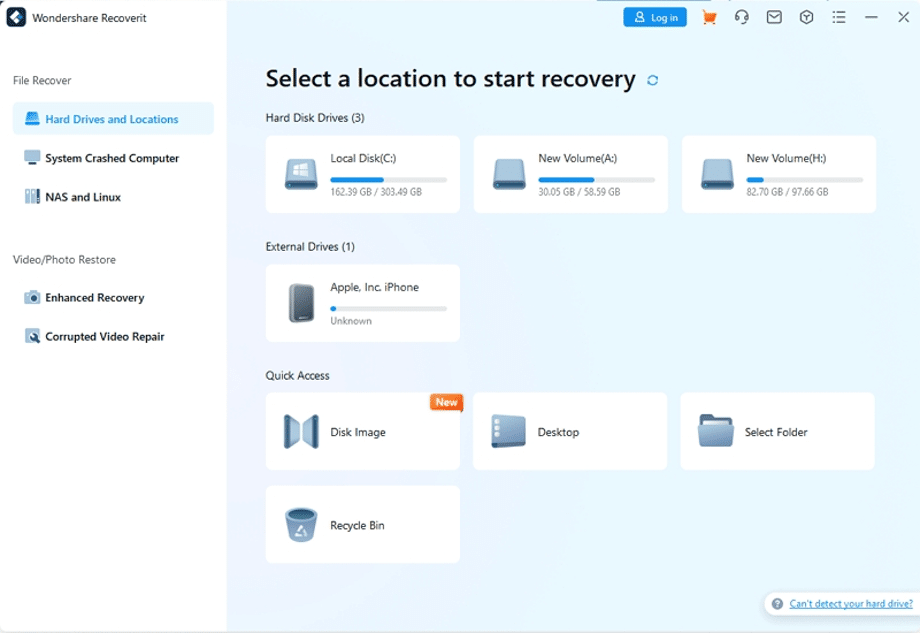
Step 1: Launch Wondershare Recoverit and Scan Drive
Initially, launch the platform on your device and go to “Hard Drives and Location.” Next, select a location from “Hard Disk Drive” and click “Scan.” Recoverit will start the automated scanning of your chosen drive.
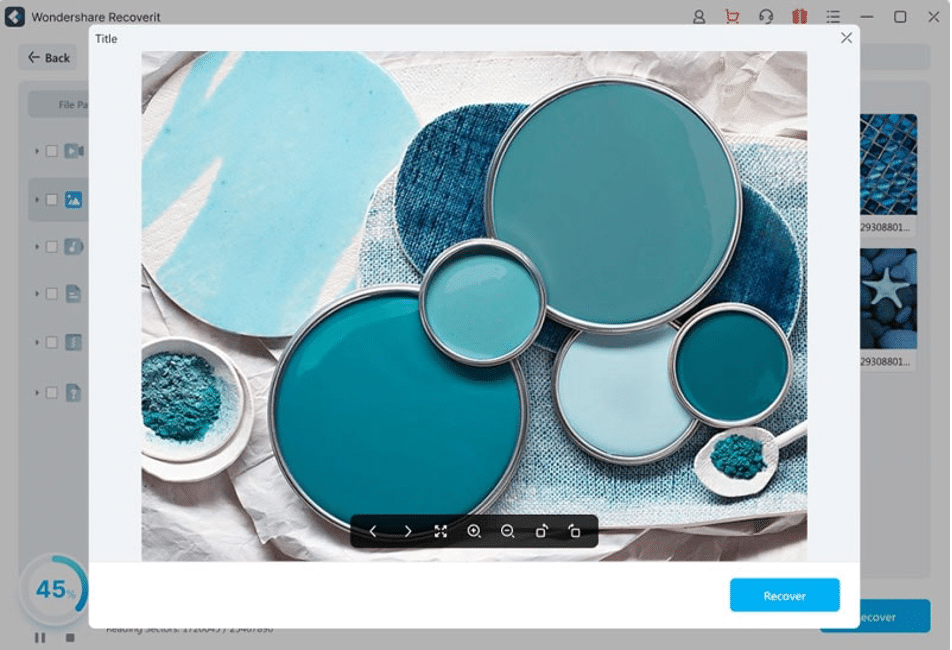
Step 2: Recover the Deleted Files
Following this, pinpoint the files you wish to recover and hit the “Stop” icon. You can preview the recoverable files by clicking the “Preview” button. To complete the data recovery procedure, click the “Recover” button and select the destination folder.
Install the Latest Data Recovery Version of Wondershare Recoverit To Get the Lost Data Within Seconds <<
Wrapping Up
In a nutshell, it can be said that anyone can lose data, but there are a few things that you should avoid. You can see these things, along with practices to prevent data loss, in the above discussion. If you want to recover data with the best data recovery tool, the answer is Wondershare Recoverit.











