
iLoungeiLounge
  • News
    • Apple
      • AirPods Pro
      • AirPlay
      • Apps
        • Apple Music
      • iCloud
      • iTunes
      • HealthKit
      • HomeKit
      • HomePod
      • iOS 13
      • Apple Pay
      • Apple TV
      • Siri
    • Rumors
    • Humor
    • Technology
      • CES
    • Daily Deals
    • Articles
    • Web Stories
  • iPhone
    • iPhone Accessories
  • iPad
  • iPod
    • iPod Accessories
  • Apple Watch
    • Apple Watch Accessories
  • Mac
    • MacBook Air
    • MacBook Pro
  • Reviews
    • App Reviews
  • How-to
    • Ask iLounge
Font ResizerAa
iLoungeiLounge
Font ResizerAa
Search
  • News
    • Apple
    • Rumors
    • Humor
    • Technology
    • Daily Deals
    • Articles
    • Web Stories
  • iPhone
    • iPhone Accessories
  • iPad
  • iPod
    • iPod Accessories
  • Apple Watch
    • Apple Watch Accessories
  • Mac
    • MacBook Air
    • MacBook Pro
  • Reviews
    • App Reviews
  • How-to
    • Ask iLounge
Follow US

Articles

Articles

Common Mac Issues and How To Fix Them

Last updated: Sep 7, 2019 9:26 pm UTC
By Lucy Bennett
Mac Repair Nottingham

Is your Mac becoming increasingly slow and lags at the strangest times?


We spoke to a independent Macintosh technician over in the United Kingdom to give us the inside information you can’t always find speaking to your local genius bar. 

Mac Repair Nottingham

Before you put your trusty laptop out to pasture, check and see if it can be resolved with these five common Mac solutions, and even if not there’s still hope.
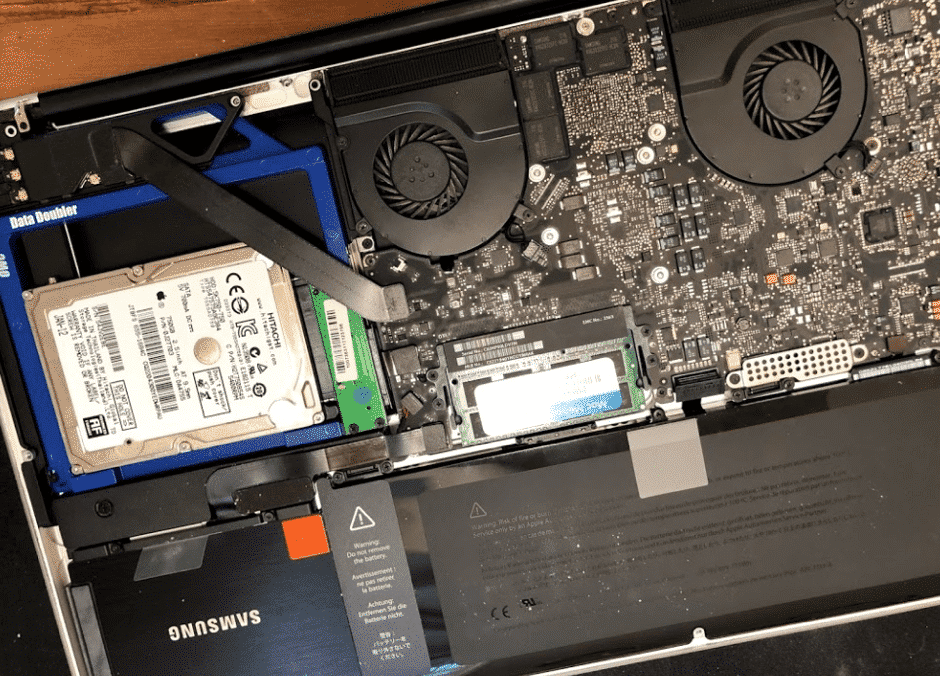
MacBook and iMacs

Some vintage models of MacBook and iMacs are able to have their ram upgraded or better still have the standard hard drive replaced with a SSD.


Johnathan over at Mac Repair Nottingham which is one of the oldest running independents in the UK says that many vintage Mac’s can be speeded up to run up to 20x faster than when they was new!

Mac Repair Nottingham

The inside word is Apple put a lot of cheap HSTC hard drives in the computers between 2011 and 2017 so this could be a reason for such a slow mac.

But before give these a try.

Blank Screen

A blue or black screen that stays is a sign that your computer has froze at the log in or when you’re in the midst of opening an app. You can force the Mac to restart by pressing and holding the power button for about six seconds. If the problem doesn’t go away, boot to Safe Mode, then remove any apps that could be causing the issue.


Gray Screen

A gray screen that displays the Mac logo in the middle means that an important software update has failed. Here, you can restart and open your Mac in Safe Mode, then complete any pending updates to your macOS software. For good measure, run the Disk Utility tool to see if there are any disk issues.

MacBook Keeps Shutting Down

The first thing you should do is to see if the laptop’s battery is still working. Once you eliminate this possibility and the Mac keeps shutting down, this could be a different thing altogether.


Restart the computer with the power button and wait for the operating system to completely load. Then, do a proper shutdown. You may also reset the SMC, or System Management Controller so hardware processes get a reset, e.g., sleep mode, battery charging and others. if these steps don’t work, it’s best to bring it to a  professional for a reliably quick resolution.

Unresponsive App

A non-responding Mac may indicate an app problem. The whole computer may freeze, and may not even allow you to exit or quit the app.

Open the ‘Force Quit’ menu by hitting the Escape-Option-Command. Highlight the non-responsive app, then choose ‘quit’

Spinning Beach Ball

Slowdowns can be resolved by finding out the program that could be causing it.

Open Activity Monitor and see how much each app is affecting your Mac’s resource. Quit the programs you’re not using, or uninstall it if you don’t need it anymore.

Thank you to Johnathan at Mac repair UK, a former genius employee for the insight.


Latest News
The 14-inch MacBook Pro with M5 Chip 16GB RAM/512GB is $250 Off
1 Min Read
Noise and Static on AirPods Pro 3 Still Unfixed
1 Min Read
New iMac with 24-inch OLED Display May be Brighter With 600 Nits
1 Min Read
The 15-inch M4 MacBook Air 256GB Is $250 Off
1 Min Read
Internal Kernel Debug Kit from Apple Reveals Tests for a MacBook with A15 Chip
1 Min Read
Apple Currently In Talks With Suppliers for Chip Assembly & Packaging of iPhones in India
1 Min Read
Apple Allows Easier Battery Replacement For M5 MacBook Pro with 14-inch Display
1 Min Read
The Apple Watch SE 3 44mm GPS is $50 Off
1 Min Read
20th Anniversary iPhone May Launch in Two Years
1 Min Read
Better Image Generation Capabilities and Apple Music Integration Coming to ChatGPT
1 Min Read
A20 Pro Chip Coming to Next Gen iPad Mini OLED
1 Min Read
Amazon has the AirTag 4 Pack Marked $29 off
1 Min Read

iLounge logo

iLounge is an independent resource for all things iPod, iPhone, iPad, and beyond. iPod, iPhone, iPad, iTunes, Apple TV, and the Apple logo are trademarks of Apple Inc.

This website is not affiliated with Apple Inc.
iLounge © 2001 - 2025. All Rights Reserved.
  • Contact Us
  • Submit News
  • About Us
  • Forums
  • Privacy Policy
  • Terms Of Use
Welcome Back!

Sign in to your account

Lost your password?










