

Flying can be boring, particularly on long flights. You can pass the time watching your favorite documentaries or programs. But what if you don’t have Wi-Fi on your flight? Or what if it can’t stream anything fast enough? The good news: Amazon Prime Video allows you to download movies and shows before a flight. In this article, we’ll share with you the smart way to do it. It’s simple, fast, and will make your trip much more entertaining.
Part 1: The Travel Struggle: What You May Come Across on a Plane
You’re taking a long-haul flight. You’ve got your snacks packed, the neck pillow you only use when you fly, and you’re finally going to catch up on that Amazon Prime series you’ve been meaning to watch. You pull up the Prime Video app, only to run into a wall. The in-flight Wi-Fi sucks, is too slow, or costs way too much. It may be $25 just to have two hours of access.” Even if you pay, streaming an entire show or movie is a crapshoot. It could be buffering every few seconds, or it may just stop playing. Now you have no viable entertainment options at 35,000 feet.

You take a glance at the screen in the seat ahead to see if there is anything decent on. But it’s littered with old movies or things you’ve already watched. It happens to many travellers. But the reality is, it’s completely avoidable if you think a little in advance. This is where Amazon Prime Video’s download feature comes into play. Let us show you the smart way to prepare so that next time, you’ll be able to enjoy your favorite shows without a hitch.
Part 2: The Perfect Solution: Offline Viewing
The good news is that there are ways to prepare and still enjoy all your Amazon Prime Video content without needing to be on the internet. This enables you to watch your favorite show or movie offline on an aeroplane, on a road trip, or even while using mobile data without needing Wi-Fi any time you wish.
Built-in Download Option (But with Limits)
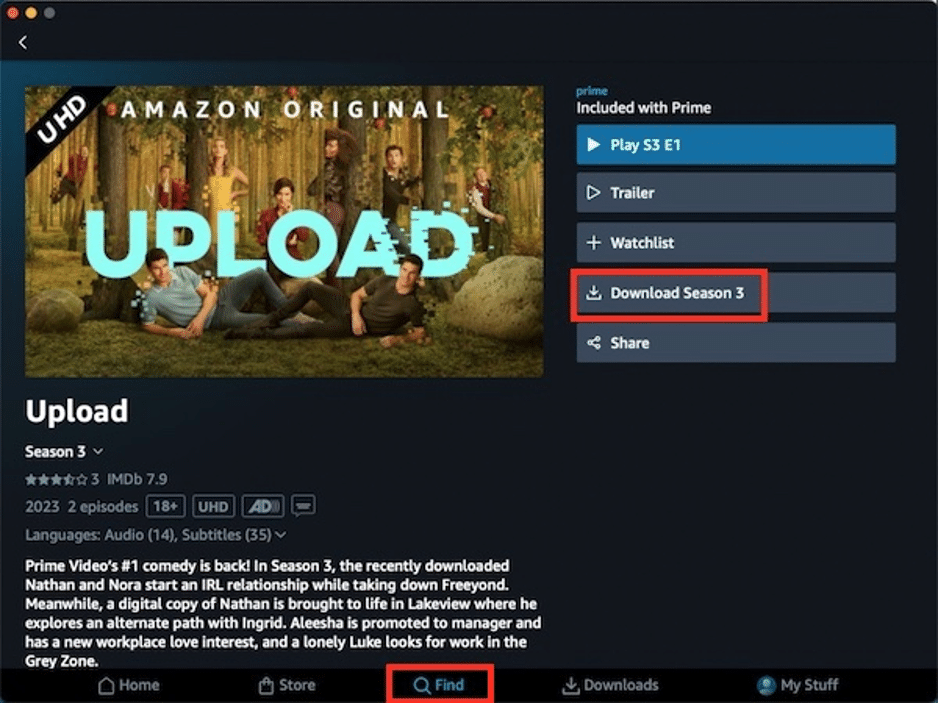
If you’ve used the Amazon Prime Video app on your phone or tablet, you may have been able to download episodes or movies to watch in aeroplane mode or on the road. This feature is handy if you need to pick up a few things before your journey. It’s fast, it’s simple, and it happens all without ever leaving the app. However, here’s the catch: It has a few limitations.
First, not all of the titles can be downloaded. Some movies or shows don’t have the download button available at all. Second, the downloads have an expiration date. They die after a couple of days, even though you might not have been watching them. And third, you can watch those downloads only inside the Amazon Prime app.
You are unable to transfer the files to your computer, consume them using a different media player or share them with your family members. Amazon, in other words, tightly controls the files. So while this is great if you’re on a short trip or just watching something casually, it’s not ideal if you want to have more flexibility with your downloads.
Despite there are certain flaws in the Amazon Prime Video download feature, it is still the easiest way to save videos offline for you to watch on a plane. Here is the guide on how to do it.
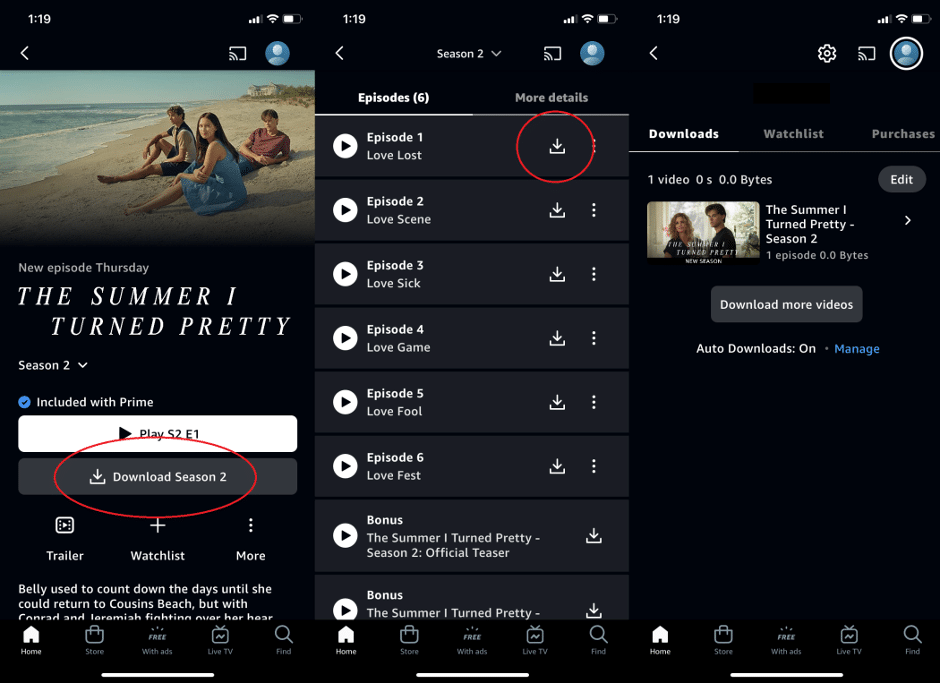
Step 1: To download a title from Prime Video, open the app on your device and find the title you want.
Step 2: Select the download icon (often a downward-facing arrow) next to the title or episode.
Step 3: The downloaded content will be available in the “Downloads” or “My Stuff” section of the app.
The Better Option: Using a Downloader
If you want something better, something that can give you more control over your downloads, then a tool like CleverGet Amazon Downloader will help. CleverGet is a solid Amazon video downloader that lets you save media directly to your computer. The best part? You’re not restricted by Amazon’s limits. You can download and keep high-quality versions of our videos on any device you own and watch anywhere, even without the Prime Video app.

Looking to stash that whole season of your favourite show, in 1080p? You can. Need to copy the movie to your tablet or USB to watch at your convenience? No problem. And after you download the video, there’s no expiration date. It’s yours to keep. You have control with CleverGet. So, whether you’re on a plane, in a car, or just want to grow your collection of movies, it’s easy to add new titles to your library, even if you don’t have an internet connection. With CleverGet, downloading Amazon Prime videos is a lot simpler than you may think. It doesn’t matter how technically proficient you are, following a couple of very simple steps, and suddenly you can watch your favourite programs and films wherever you are
Part 3: Tips for Flying
Now that you’ve got all your favourite shows and movies downloaded and ready to go, it’s time to do your due diligence when it comes to making sure your flight isn’t a miserable mess. A little planning can go a long way. Here are some simple tips to get the most out of your offline viewing:
1. Charge Your Devices In Advance
Make sure to charge your phone, tablet or laptop completely the night before you fly, and bring a charging cable to the airport with you.
2. Use Noise-Cancelling Headphones
Aeroplanes can be loud, with engine noise, crying babies, and people talking. Noise-cancelling headphones help block out all that background sound so you can focus on your show without cranking up the volume.
3. Organise Your Downloads Ahead Of Time
A few minutes of sorting your downloads before boarding will go a long way. Make sure episodes are played in the correct order, or place movies in a folder or playlist, so they are easily found.
Conclusion:
Air travel can be boring, but not if you can take your favourite Amazon Prime shows and movies with you. With a bit of preparation, you can enjoy your content offline. Amazon’s app may allow you to download it, but CleverGet Amazon Downloader provides you with considerably more options. It’s simple to use, allows you to save videos permanently, and functions on any device. If you want a smart, flexible way to enjoy Prime Video anywhere, CleverGet is the way to go.











