

Apple’s iCloud has long served as a primary platform for users to back up and store their device data, including photos, documents, application backups, and more. As these backups can contain sensitive information, many wonder whether they are secure. In 2014, a major scandal unfolded: hundreds of celebrities’ personal photos were leaked to the public, all stolen from their iCloud accounts. The investigation into the causes of this breach revealed weak account protection. In those days, a malicious actor could gain access to an account using solely the user’s Apple ID and password,
Apple learned this lesson and in the following years implemented two-factor authentication that made unauthorized access to an iCloud account nearly impossible. But their efforts didn’t end there. In version 16.2, they introduced the Advanced Data Protection (ADP) option that provides one more layer of security for iCloud.

In this article, we will explore how Advanced Data Protection affects iCloud storage and what it implies for legitimate third-party access to iCloud data—during a digital forensic investigation.
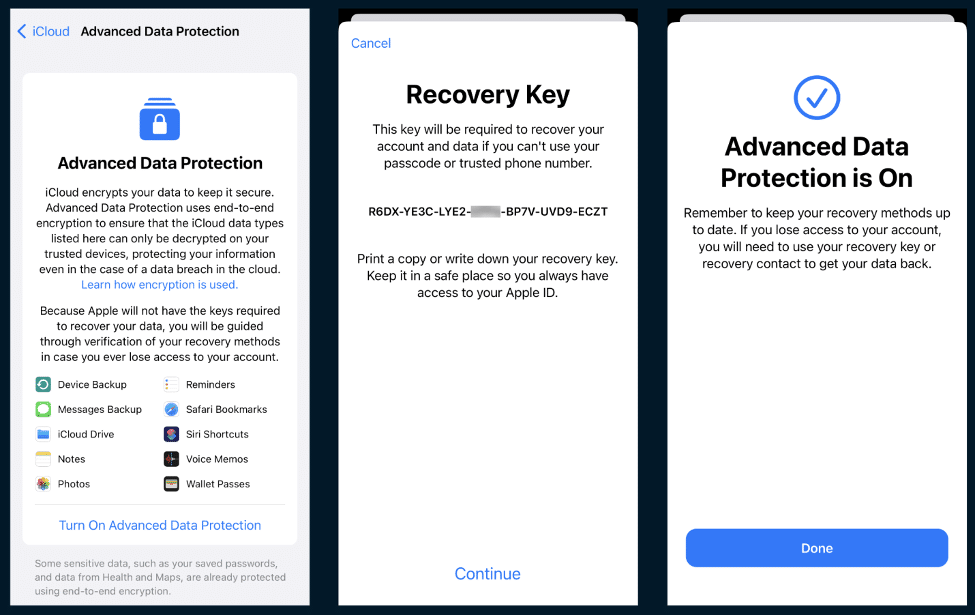
iCloud security: Standard and advanced
iCloud security employs a robust set of safeguards, starting with two-factor authentication (2FA), a prerequisite for syncing with Apple devices. Upon activating 2FA, iCloud instantly enhances data protection standards.
Standard data protection measures ensure sensitive user information, including keychain access, health details, and payment data, are encrypted from end to end. This guarantees that such data can be decrypted exclusively on trusted devices, enhancing security. In contrast, other types of information such as contacts, iCloud emails, calendars, and device backup data are encrypted only while being transmitted. Once on Apple’s servers, this data resides alongside the encryption keys. This setup poses a potential risk, as the encryption keys could be downloaded with the data, allowing for decryption.
Advanced Data Protection provides an additional authentication factor. To enable ADP, users must generate a recovery key or assign a trusted contact who can assist in regaining access to iCloud data.
Forensic extraction of iCloud data
iCloud data is vital in investigations for its ability to uncover communication logs, including emails and messages, which can provide evidence of criminal or corporate wrongdoing. Additionally, iCloud backups often contain contacts, calendars, and photos, that help reconstruct events.
To access iCloud data, digital investigators legally obtain iCloud credentials and use devices they are linked to for authentication. To extract and analyze data from iCloud, they use mobile forensics tools. For example, Belkasoft X offers several cloud extraction methods, including two options for iCloud:
- iCloud: this method helps acquire iCloud mail, calendars, media files, and other data accessible when logging in to an Apple account on icloud.com
- iCloud backup: This option efficiently retrieves the necessary data for restoring an Apple device. It covers system files, iMessage conversations, and data from iOS and various applications that use iCloud for backup purposes, such as WhatsApp and Viber, among others.
These methods require Apple ID credentials used to access iCloud and a device tied to this Apple ID to pass 2FA.
When ADP is enabled, extra security measures are in place. For authentication in iCloud, Apple will require the third element—the recovery key created on the device or an authorization from the recovery contact. Will a digital forensics tool be able to bypass this requirement?
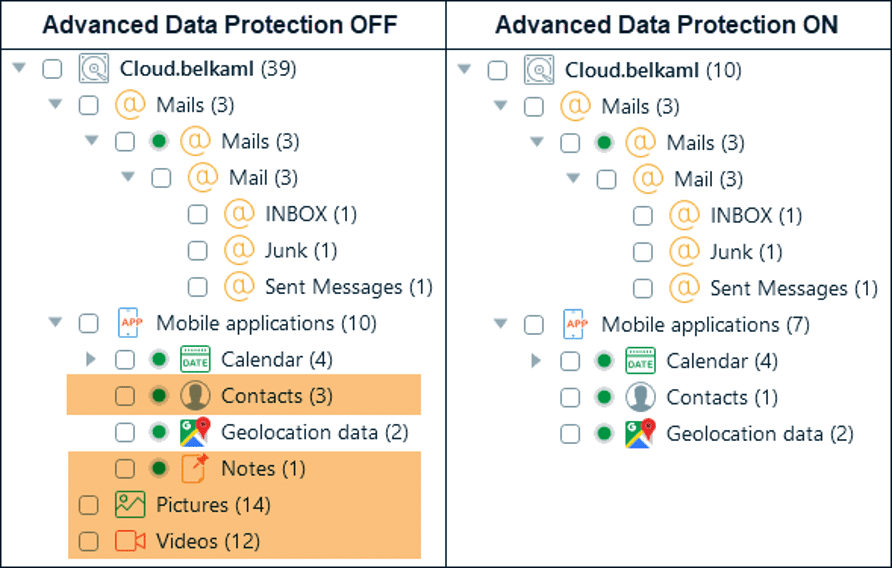
Acquisition of iCloud with enabled ADP
Here is a comparison of the iCloud data types that were acquired with Belkasoft X before and after enabling Advanced Data Protection for an iCloud account:
As you can see, both extractions include mail, calendar, and some geolocation data. However, once ADP is enabled, the tool cannot retrieve media files, notes, or contacts (except for the account owner’s one). Another important point to mention is that after ADP activation, forensic extraction of iCloud backup is no longer possible.
How digital investigators can bypass ADP
Even with Advanced Data Protection enabled, mobile forensics software can extract some part of iCloud data. However, at this point, it still needs to learn how to deal with ADP to obtain all data it secures.
If you look for ways to override iCloud ADP, one viable option is to switch it off in the device settings. This action does not require the recovery key—just the device passcode. However, it may not be forensically sound since it will trigger an iCloud backup that can potentially overwrite important data.











