
iLoungeiLounge
  • News
    • Apple
      • AirPods Pro
      • AirPlay
      • Apps
        • Apple Music
      • iCloud
      • iTunes
      • HealthKit
      • HomeKit
      • HomePod
      • iOS 13
      • Apple Pay
      • Apple TV
      • Siri
    • Rumors
    • Humor
    • Technology
      • CES
    • Daily Deals
    • Articles
    • Web Stories
  • iPhone
    • iPhone Accessories
  • iPad
  • iPod
    • iPod Accessories
  • Apple Watch
    • Apple Watch Accessories
  • Mac
    • MacBook Air
    • MacBook Pro
  • Reviews
    • App Reviews
  • How-to
    • Ask iLounge
Font ResizerAa
iLoungeiLounge
Font ResizerAa
Search
  • News
    • Apple
    • Rumors
    • Humor
    • Technology
    • Daily Deals
    • Articles
    • Web Stories
  • iPhone
    • iPhone Accessories
  • iPad
  • iPod
    • iPod Accessories
  • Apple Watch
    • Apple Watch Accessories
  • Mac
    • MacBook Air
    • MacBook Pro
  • Reviews
    • App Reviews
  • How-to
    • Ask iLounge
Follow US

Articles

Articles

Best Data Recovery Software for Mac OS X: Restore your Files Easily

Last updated: Oct 10, 2019 2:34 am UTC
By Lucy Bennett
Best Data Recovery Software for Mac OS X: Restore your Files Easily

We all depend on our devices, but we never know when something unexpected happens that might lead to the loss of our files. In this situation, you should not lose your hope, and start doing something right away. In this situation, some recovery apps might be a great solution. On this page, you will find info about the best file recovery tools for macOS as well as some tips on what should you do if you lose your files.


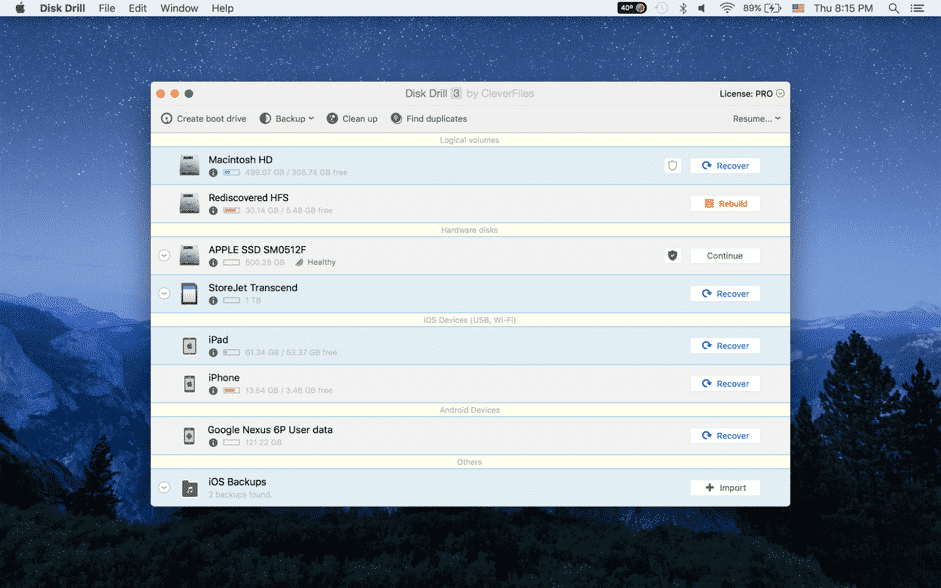
Disk Drill: Everything you need to know
Disk Drill: Everything you need to know

In this Disk Drill review, you can find the main facts and advantages of using the services of this company. Is it worth your time and money? Learn here.

Best Data Recovery Software for Mac OS X: Restore your Files Easily
  • This is the best data recovery tool that will scan your device (or some part of your device) in order to find your lost files. The program will take only a few minutes to complete, and you won’t have to wait for hours until it is done.
  • If you were looking for the best data recovery software with multiple features then you have finally found it. Disk Drill offers a number of great features, and some of them are Deep and Free scans, healing algorithms, protections of the data, portable media recovery, as well as many others.
  • All of the prices this service has to offer are low. There is even a free version of the app that will allow you to use some of the main features of Disk Drill. With the paid version, you get some nice perks too.
  • Disk Drill is the top free file recovery software that offers customer support non-stop. No matter what kind of issue you might have, you will still get the help you need.

What should you do if your files were deleted?

Here you can find all the steps you need to take when you end up in a situation where you have lost your files. Follow this instruction to achieve full data recovery:


  1. Stop saving any files on your device. If you see that somehow your files disappeared, don’t save anything else on the gadget until you fix the issue. Otherwise, you will lose your other data that might never be recovered.
  2. You should act fast. Right after you notice that something is off, start doing something. Use online guides and the best data recovery app for Mac in order to bring your files back.
  3. Check the trash bin. There is always a possibility that you might have deleted your data without seeing it. It takes only a few clicks to delete something, so don’t exclude this option. Check your bin, and if you find your files there, just restore them.
  4. If your file was deleted from a hard or flash drive or any other external device, you can check the trash bins of these devices. But there is a small trick when it comes to these devices since usually deleted files are hidden. You have to do some researching and digging and use a few special commands. Look online to find more information about it.
  5. Create backups. One of the best ways out of situations like this is, of course, creating backups for all the data you have. You won’t have to worry about the safety of your files anymore.

If you have lost your files, this is still not a reason to worry: there is always a solution to any problem. You can always use the Mac data recovery app to get your files back, so don’t panic.



Latest News
The 14-inch MacBook Pro with M5 Chip 16GB RAM/512GB is $250 Off
1 Min Read
Noise and Static on AirPods Pro 3 Still Unfixed
1 Min Read
New iMac with 24-inch OLED Display May be Brighter With 600 Nits
1 Min Read
The 15-inch M4 MacBook Air 256GB Is $250 Off
1 Min Read
Internal Kernel Debug Kit from Apple Reveals Tests for a MacBook with A15 Chip
1 Min Read
Apple Currently In Talks With Suppliers for Chip Assembly & Packaging of iPhones in India
1 Min Read
Apple Allows Easier Battery Replacement For M5 MacBook Pro with 14-inch Display
1 Min Read
The Apple Watch SE 3 44mm GPS is $50 Off
1 Min Read
20th Anniversary iPhone May Launch in Two Years
1 Min Read
Better Image Generation Capabilities and Apple Music Integration Coming to ChatGPT
1 Min Read
A20 Pro Chip Coming to Next Gen iPad Mini OLED
1 Min Read
Amazon has the AirTag 4 Pack Marked $29 off
1 Min Read

iLounge logo

iLounge is an independent resource for all things iPod, iPhone, iPad, and beyond. iPod, iPhone, iPad, iTunes, Apple TV, and the Apple logo are trademarks of Apple Inc.

This website is not affiliated with Apple Inc.
iLounge © 2001 - 2025. All Rights Reserved.
  • Contact Us
  • Submit News
  • About Us
  • Forums
  • Privacy Policy
  • Terms Of Use
Welcome Back!

Sign in to your account

Lost your password?








