
Imagine being able to swap faces with your favorite movie star or dive into a historical event as one of its figures. With video face swap tools, this and much more is possible, opening up a world where digital creativity knows no bounds. These tools are not just a source of endless fun, allowing you to share hilarious creations with friends on social media, but they also have a serious side, especially in education and training. They bring concepts to life, make learning more interactive, and cater to various learning preferences.
Dive into the innovative world of video face swapping, where you can unleash your creativity, engage audiences, and enhance your digital presence. We’ve handpicked top applications to transform your digital experiences. Get ready to explore tools that offer both laughter and learning, enriching your interactions online.
1. Pica AI

Pica AI tops our list as one of the most popular face swap platforms, offering a versatile set of features that cater to various needs—from single-face swaps to multi-face and video face swaps. It stands out with its wide range of templates in categories like Memes, Fashion, Cosplay, Emoticons, and Dance, powered by advanced facial recognition technology that ensures smooth and realistic swaps in both photos and videos. An appealing aspect of Pica AI is its affordability, providing 10 free credits daily, which means you can swap up to 10 images or engage in at least one video face swap service every day. Furthermore, Pica AI supports swapping up to 5 faces simultaneously in a single video, expanding creative possibilities and making it an ideal choice for group videos.
Utilizing Pica AI is straightforward: upload your video, and it calculates the number of faces for replacement. Then, select a template with a simple “Swap Now” tap and wait for the result, which you can save by hitting the “Save Now” button. This seamless process and the generous free credit system make Pica AI a go-to solution for both beginners and seasoned users looking to explore creative face-swapping without the hassle.
2. Reface AI
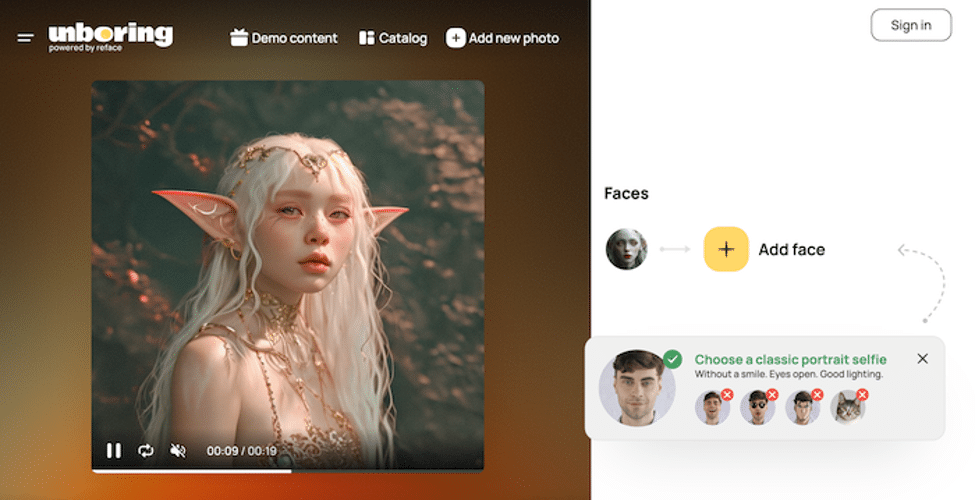
The next recommended video face-swapping tool is Reface. Its face-swapping features are provided on a website called Unboxing which is renowned for its feature of replacing faces with tons of templates of photos and videos. The photo and video templates provided varied from the ancient era, movie scenes, spaceship themes, AI-related themes to the modern living era. You can also find some famous characters like comic characters, superheroes, or celebrities.
Just like Pica AI, Reface AI also offers free trials. However, it is not calculated per day, but only once in the first two days. The paid subscription plan is divided into two different types each, which costs $7.99 for the Basic level and $17.99 for the Premium level. The difference is that the Premium plan does not have limitations, and supports video restyle, while the Basic plan has a limitation of up to 100 photos each month and does not support video restyle.
3. Magic Hour

Claimed to be more than just a face-swapping tool, Magic Hour uses a complex algorithm that blends faces into films to provide realistic looks and smooth transitions. This platform is basically a photo generation tool that offers several features other than face swapping, i.e. video-to-video, which can transform video into a style; image-to-video, which converts an image into video; text-to-video, which supports text-prompt to generate a video; as well as animation, which allows you to create an animation with sound in it.
As for the video face-swapping tool, it supports manual video upload and video from YouTube by simply pasting the link on it. This allows you to quote any video from YouTube and change your or your loved ones’ faces easily. The only downside is that you will have to sign in before using it, and it contains a watermark for the free version. The paid plan costs $12.99/per month and $64.99 per month. The main differences between these two plans are the video duration and video resolution.
4. Deepswap
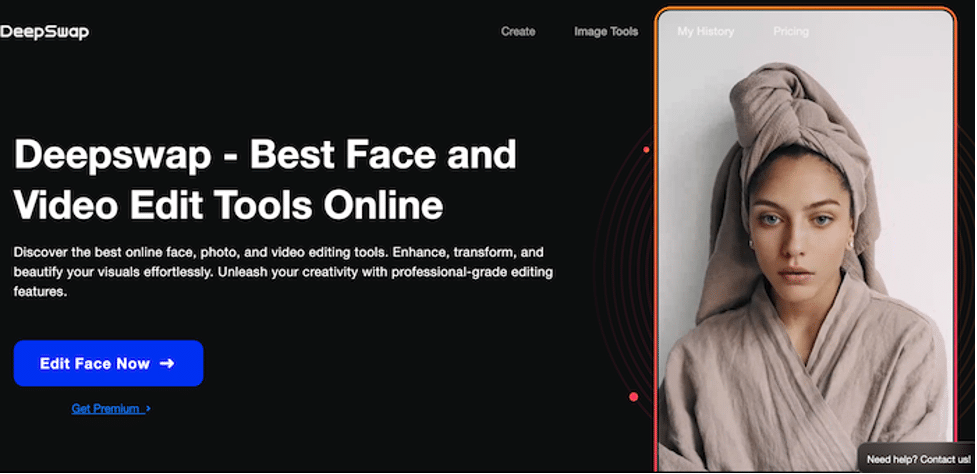
Another best video face-swapping tool is Deepswap. Its versatile interface allows those who imagine themselves adopting the persona of famous actors in iconic movie scenes into a reality, just a few simple steps. Deepswap boasts to not only swap faces in photos or videos online, but also improve, alter, and beautify your images easily, ensuring that you will have the best-designed and life-like output.
A video clip and a selfie are the only requirements for Deepswap to produce your artwork. It can produce memes or GIFs that can surely make you laugh! However, you will need to spend a penny to use it. It does not offer a free trial and only supports paid plans. This paid plan costs $9.99 per month or $49.99 per year.
5. AKOOL

Once you’re on the website of AKOOL, you will feel a different kind of vibes, just like you’re in a different world. With this tool, you can build your own studio experience, swap faces, as well as create custom avatars. Its user-friendly interface streamlines the process and aims to produce high-quality output, that is suitable for people from any industry, i.e. social media content creators, commercial agents, designers, etc.
The most interesting of AKOOL is that it offers free services for anyone without signing up! Each user has free credits up to 50, which is more than enough for you as casual users. However, you will have to deal with its watermark. If you wish to generate a video without a watermark on a larger scale, simply write an email to the company.
Conclusion
Thanks to the evolution of AI technology, we can manipulate images in ways we previously thought were only possible in fiction films. The five video face swap AI tools highlighted above open up a new world of creative possibilities, offering you the ability to transform video with stunning faces and captivating visual effects effortlessly.
All that’s left is for you to dive in and start exploring these video face-swap tools. They can empower you to unleash your creativity and bring your ideas to life in ways never possible before.











