
iLoungeiLounge
  • News
    • Apple
      • AirPods Pro
      • AirPlay
      • Apps
        • Apple Music
      • iCloud
      • iTunes
      • HealthKit
      • HomeKit
      • HomePod
      • iOS 13
      • Apple Pay
      • Apple TV
      • Siri
    • Rumors
    • Humor
    • Technology
      • CES
    • Daily Deals
    • Articles
    • Web Stories
  • iPhone
    • iPhone Accessories
  • iPad
  • iPod
    • iPod Accessories
  • Apple Watch
    • Apple Watch Accessories
  • Mac
    • MacBook Air
    • MacBook Pro
  • Reviews
    • App Reviews
  • How-to
    • Ask iLounge
Font ResizerAa
iLoungeiLounge
Font ResizerAa
Search
  • News
    • Apple
    • Rumors
    • Humor
    • Technology
    • Daily Deals
    • Articles
    • Web Stories
  • iPhone
    • iPhone Accessories
  • iPad
  • iPod
    • iPod Accessories
  • Apple Watch
    • Apple Watch Accessories
  • Mac
    • MacBook Air
    • MacBook Pro
  • Reviews
    • App Reviews
  • How-to
    • Ask iLounge
Follow US

Articles

Articles

Advanced Video Editing Features in Video Converters

Last updated: Aug 22, 2023 5:48 am UTC
By Lucy Bennett
Advanced Video Editing Features in Video Converters

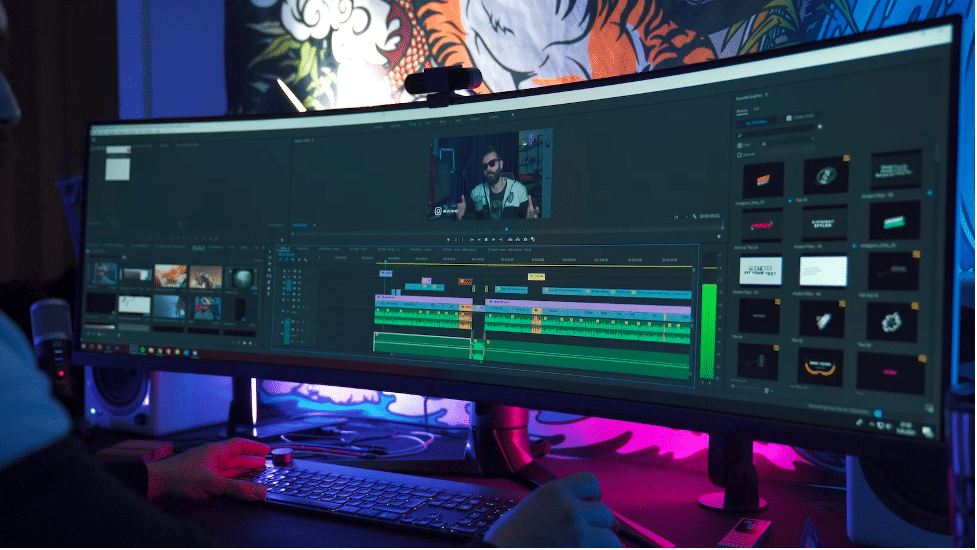
In today’s world, video converters are essential tools that video content creators can use to convert m4v to mp4 and edit footage with a variety of features. Most users are familiar only with the standard functions of applications that do not require special knowledge, however, in addition to them, the programs also have advanced functions that allow you to improve the quality of the conversion and make the video successful. In this article, we will talk about exactly those functions that were left out but are also important and necessary when working with software.

Advanced Video Editing Features in Video Converters

Useful Video Editing Features in Converters

At the moment, working with video content has become an integral part of the lives of many people. In this regard, new programs for converting videos began to appear that help users create high-quality content. Many content makers use the WinX HD Video Converter Deluxe application, which allows you to reliably convert and edit frames using a large number of tools. However, not all users are aware of the advanced features of the software, let’s talk about them below.


Advanced Video Editing Features in Video Converters

Clip Editing Tools

The use of editing functions helps users not only make high-quality conversions but also remove unnecessary frames, add sound, and make color corrections or beautiful transitions. Editing tools may be different, but they all have one goal – to make your video bright and unforgettable.

Text Accompaniment Integration

Adding subtitles to a clip is a great way to convey important information to the viewer that is being discussed on screen. Also, text accompaniment will provide an opportunity to easily get acquainted with your content to people with hearing impairments and capture a wider audience. Most software allows you to add subtitles right during the conversion, thereby ensuring that the text will be synchronized with the frames and there will be no delays.


Extract Audio From the Video

Using a pleasant melody in a video is the best way to grab the attention of users and push them to watch your video to the end. However, most people don’t know how to keep audio separate from video. Video Converters can help you! Going into almost any application, you can find the function to extract audio from video and do it in just a few seconds. Use the Fonepaw software and take incredible sounds and melodies for yourself without any difficulty.


Preview

The video preview feature is very useful and convenient, but for some reason most video content creators ignore it. The ability to preview the finished material helps users to see how their clip will look on one of the pages of the platform. After you see the preliminary result, you can publish the video or make adjustments to achieve a better outcome.

Conclusion

As we mentioned earlier, video converters are the best assistants for creating successful content. However, many users are still not familiar with all the features of programs that can significantly improve video quality and make it easier to work with frames. Our experts introduced you to the advanced features that applications for converting videos have, after analyzing which you can choose those that will be useful for you.



Latest News
The AirPods Pro 3 is $20 Off
1 Min Read
Exynos 2600 Chip 2nm Process Revealed by Samsung
1 Min Read
New Celebrity Ad Campaign Featuring Travis Scott Released by Beats
1 Min Read
Australia Getting Hypertension Notification Feature
1 Min Read
The 14-inch MacBook Pro with M5 Chip 16GB RAM/512GB is $250 Off
1 Min Read
Noise and Static on AirPods Pro 3 Still Unfixed
1 Min Read
New iMac with 24-inch OLED Display May be Brighter With 600 Nits
1 Min Read
The 15-inch M4 MacBook Air 256GB Is $250 Off
1 Min Read
Internal Kernel Debug Kit from Apple Reveals Tests for a MacBook with A15 Chip
1 Min Read
Apple Currently In Talks With Suppliers for Chip Assembly & Packaging of iPhones in India
1 Min Read
Apple Allows Easier Battery Replacement For M5 MacBook Pro with 14-inch Display
1 Min Read
The Apple Watch SE 3 44mm GPS is $50 Off
1 Min Read

iLounge logo

iLounge is an independent resource for all things iPod, iPhone, iPad, and beyond. iPod, iPhone, iPad, iTunes, Apple TV, and the Apple logo are trademarks of Apple Inc.

This website is not affiliated with Apple Inc.
iLounge © 2001 - 2025. All Rights Reserved.
  • Contact Us
  • Submit News
  • About Us
  • Forums
  • Privacy Policy
  • Terms Of Use
Welcome Back!

Sign in to your account

Lost your password?








