
Many creators work hard on their videos, but still struggle to make people stop and watch. Most viewers scroll away in just a few seconds. That’s where subtitles can make a big difference. Clear and creative text on screen helps grab attention fast. It also makes videos easy to follow for everyone, even when the sound is off.
With CapCut Desktop Video Editor, you can insert smart, fashionable subtitles that grab viewers from the very beginning. With the software, it is easy to synchronize words with voice and dress them up as you wish.
Although CapCut for PC is free, some of the advanced fonts and effects require payment. Through this tutorial, you will find out step by step how to create subtitles that keep viewers glued until the end.
The Strength of Subtitles in Viewer Engagement
The majority of viewers scroll over videos within three seconds. To get them to pause, something has to attract their attention immediately. Subtitles accomplish this task perfectly.
Text on screen gets people to pay attention and linger for longer. It assists them to comprehend what’s going on even if the audio is off, and this is very popular on TikTok, YouTube Shorts, and Reels.
Good subtitles also make videos accessible to anyone, including the deaf or someone who speaks another language. One strong word or an emotive caption can draw attention and make someone stop watching more. When subtitles are well-timed, they can also make creators edit condense video content more efficiently, conveying ideas quickly without sacrificing the message.
With features within CapCut Desktop Video Editor, adding these fun subtitles is a breeze. It ensures every viewer’s attention remains on your screen from beginning to end.
CapCut Desktop Video Editor Features That Bring Your Subtitles Alive
The proper tools can make plain text into something that grabs attention. CapCut Desktop Video Editor makes it simple with built-in features intended for quick and creative subtitle creation.
Auto Captions can convert speech into text in mere seconds. It is a time-saver that ensures you obtain accurate lines without manually typing out each of them. The Animation and Text Styles options allow you to make words travel, shine, or bounce in bright colors. They make the focus phrases pop and capture attention.
With AI Voice Sync, the words in the text look absolutely right in the voice, so the words come in on cue. You can also use the Font Library and Customization features to choose fonts and font sizes that match your brand’s look.
All of these intelligent tools are available for free, although certain premium fonts and styles require payment. These functions also reinforce your video marketing, as dynamic and timely text can boost watch time and views. With CapCut PC, your video can begin to communicate with viewers before a single word is spoken.
How to Add and Customize Subtitles in CapCut Desktop Video Editor
Step 1: Download and Import Video
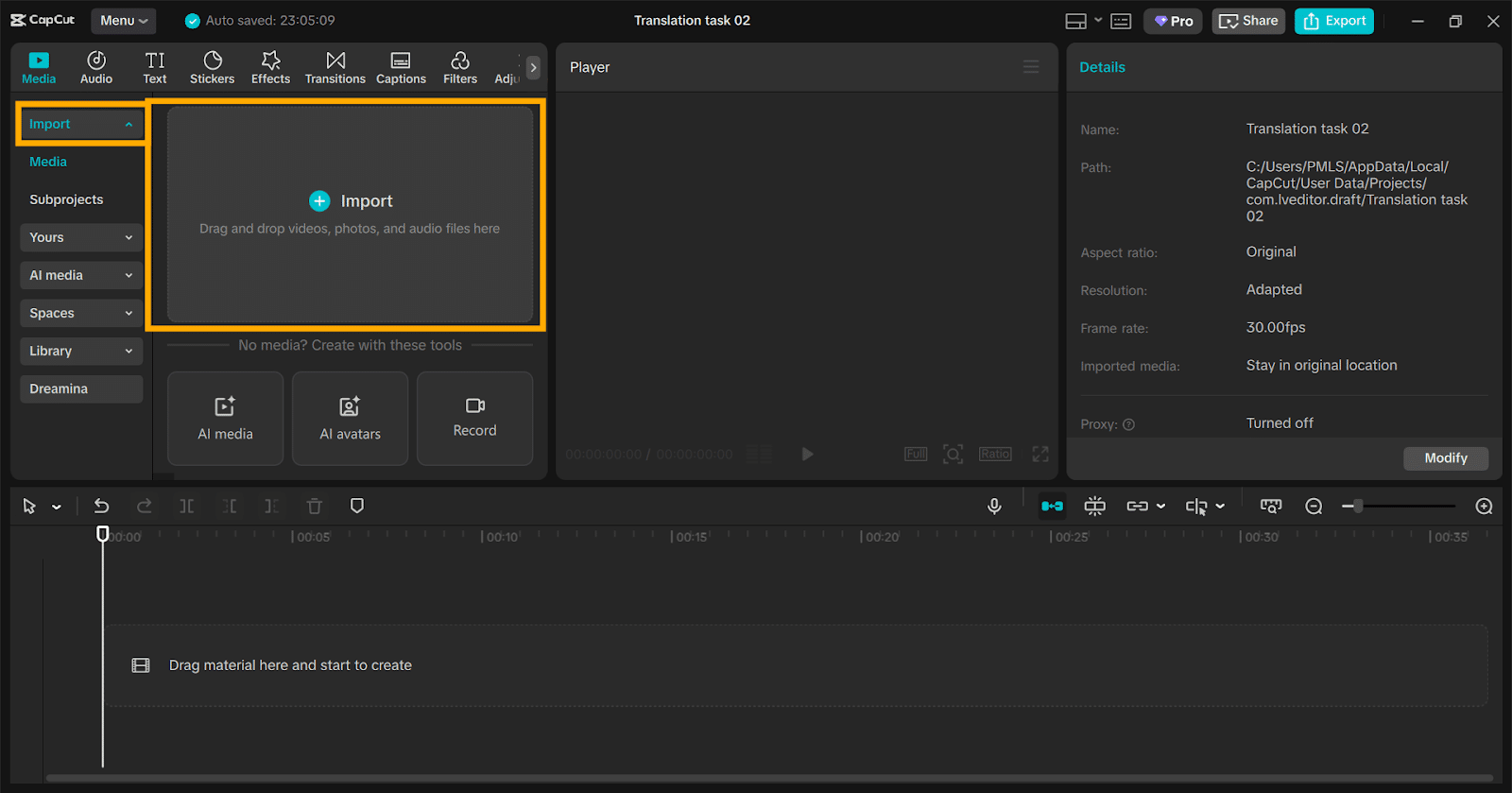
Visit the official CapCut website and download CapCut Desktop Video Editor. Install it on your computer. Launch the software and tap “Import” to upload your video clips to the editor. Drag them to the timeline at the bottom of the page after adding them.
Step 2: Generate Subtitles Automatically
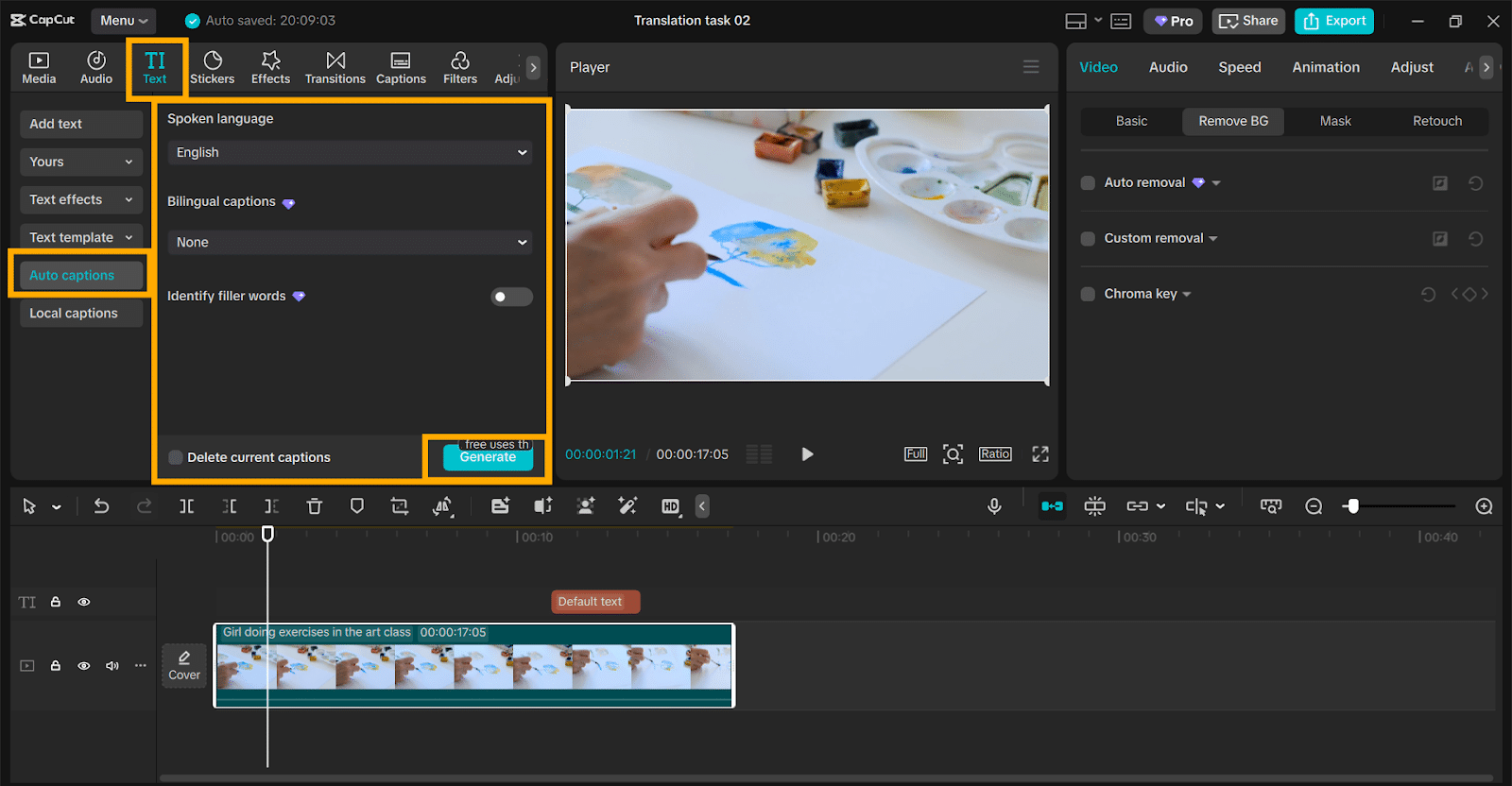
On the right toolbar, tap “Text”, then select “Auto captions.” Select your video language and tap “Generate.” CapCut PC will automatically generate subtitles that perfectly match your voice in seconds.
Step 3: Edit and Stylize Subtitles
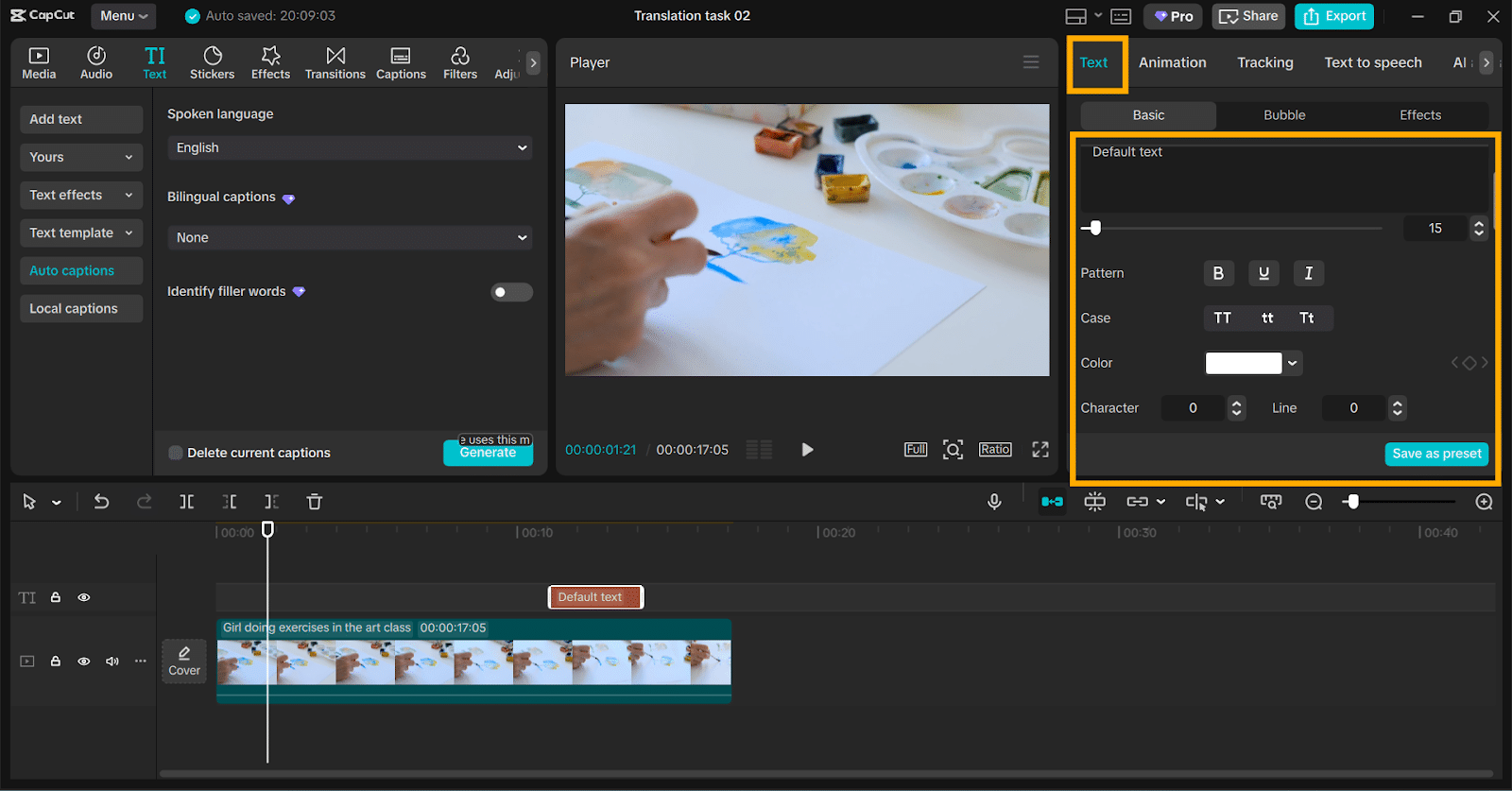
Select any subtitle block in the timeline to launch the Text Editing panel. Change the font, color, size, and outline here. Employ highlight colors or light motion effects for emphasis on key words.
Step 4: Time Adjustment and Transitions
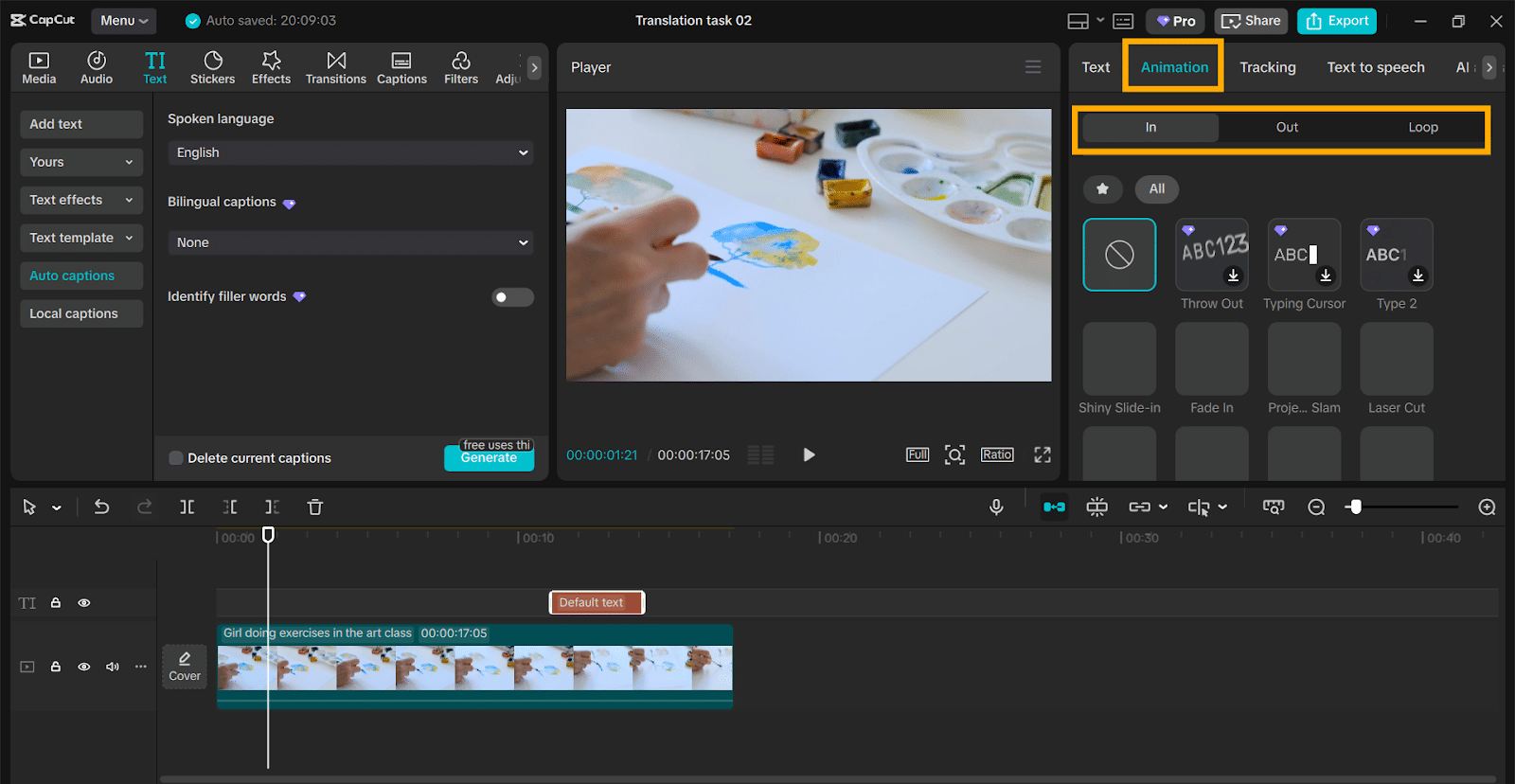
Drag each subtitle block along the timeline to sync with the voice. Incorporate fade-in or pop-up transitions from the animation options to achieve fluid text flow.
Step 5: Export and Save
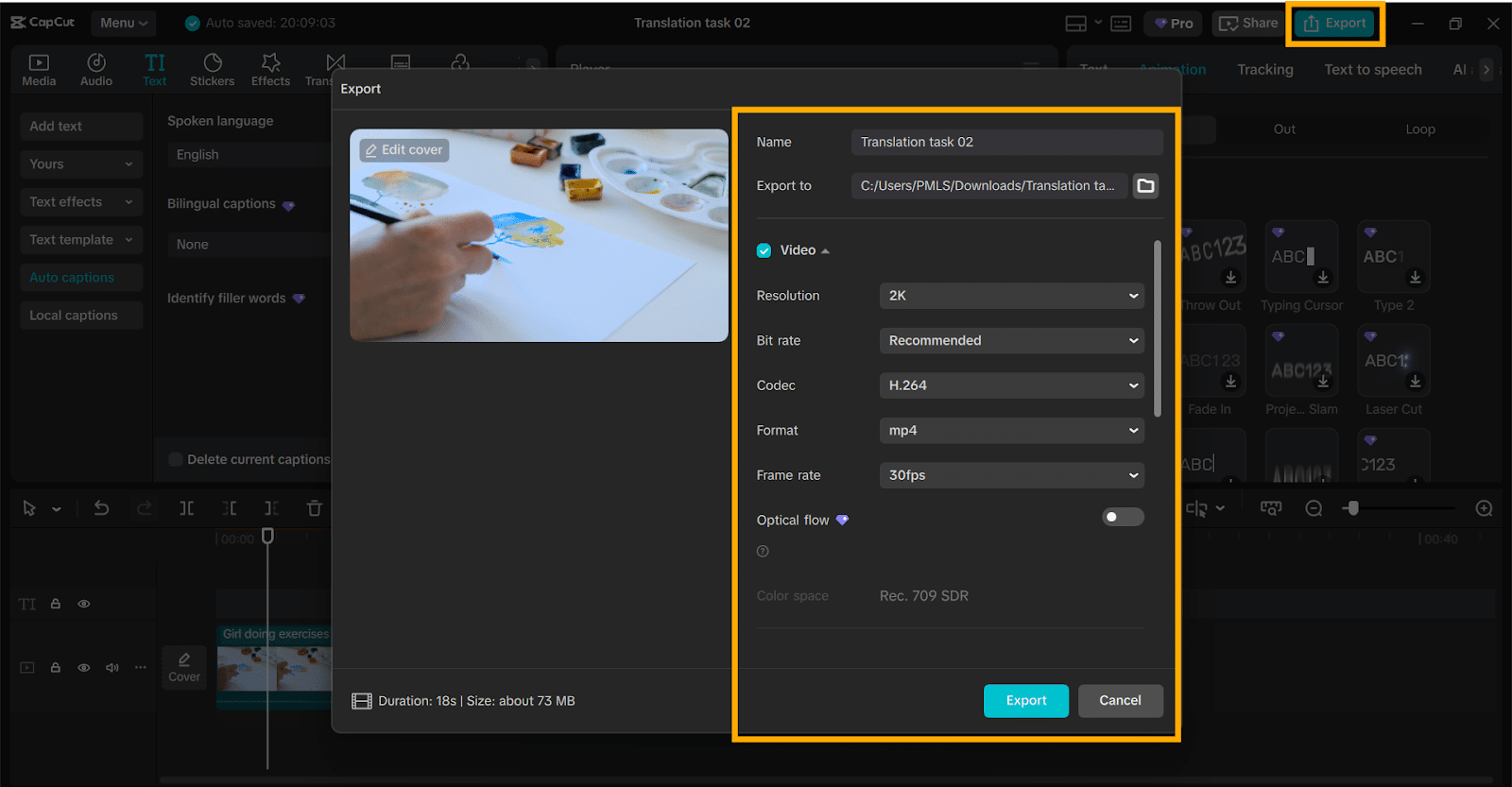
Click “Export” in the top-right corner once your video is ready. Choose the format and resolution, then click “Export” again to save. You can share the file directly to TikTok, YouTube, or Instagram, or use CapCut’s TikTok Video Editor for quicker uploads.
Conclusion
Strong subtitles can make your video stop scrolling in seconds. They grab the viewer’s attention, convey the message quickly, and engage even if the sound is muted. With CapCut Desktop Video Editor, it’s effortless for anyone to create subtitles that resonate.
Its AI captioning feature constructs subtitles in seconds, while style and animation options assist you in aligning every word to your narrative. You can fine-tune fonts, align text with your voice, and curve each caption to match your tone.
CapCut Desktop Video Editor is available to download at no cost from the CapCut website, with additional style options available to advanced editors.
Get started today with CapCut PC and make videos that don’t play. They speak to your viewers from the very first second.











