
YouTube Music is a music streaming service that widely loved for its vast library of songs, albums, and playlists, it also allow user to streaming music online for free, if you have subscribed YouTube Premium, you can download songs and playlist for offline playback in the YouTube Music app. However, users often get frustrated when their downloaded music becomes inaccessible after their subscription ends. If you want to play your favorite YouTube Music tracks on other devices without using the YouTube Music app or keep them after canceling your subscription, the best way is to download YouTube Music to MP3 or other plain audio format. That’s 4kFinder YouTube Music Converter will help you solve YT music offline playback issues.
4kFinder YouTube Music Converter offers the best solution to convert YouTube Music to MP3 320kbps, which enables you to listening to high-quality YT music offline without any limitations. In the following sections, we’ll provide an in-depth review of 4kFinder YouTube Music Converter with highlighting its essential features and capabilities.
Part 1. Why Do You Need an YouTube Music Converter?
Even you have downloaded songs for offline listening in YouTube Music app, you’re not really own them, you’re not allowed to take them out of the Music app, you cannot play YouTube Music on MP3 player, because there are many limitations in YouTube Music tracks, below I have list some main limitations in YouTube Music:
Offline Playback Limitations: Even though YouTube Music allows downloading songs for offline listening in it’s official app, once your Premium account expired, you can’t play them in offline mode.
Device Limitations: YouTube Music app only compatible with iOS, Android, PC and Mac devices, many devices are not compatible with the YouTube Music app, such as iPod Nano, Sony Walkman, PSP, car player, etc. If you want to listen to YouTube Music on MP3 player, you cannot extract them out of the YouTube Music app.
Premium Account Expired: Once your Premium account expired, you only allows to listen to those previously downloaded songs online, you cannot use the “Offline Mode”.
4kFinder YouTube Music Converter will help you solve these issues by converting YouTube Music into DRM-free MP3 audio formats. With 4kFinder, you can download YouTube Music songs, playlist and albums for offline listening without paying for YT Premium subscription, it also can convert the YouTube Music songs to DRM-free MP3 files for listening offline whenever and wherever you want.
Part 2. What is 4kFinder YouTube Music Converter?
4kFinder YouTube Music Converter is designed for YouTube Music users to easily download tracks, playlists, and albums in various formats such as MP3, M4A, AAC, FLAC, WAV, and AIFF, making them playable offline on a any devices. With its advanced audio downloading technology, it allows you to customize the output bit rate from 128kbps to 320kbps, while preserving the original sound quality and ID3 tags metadata.
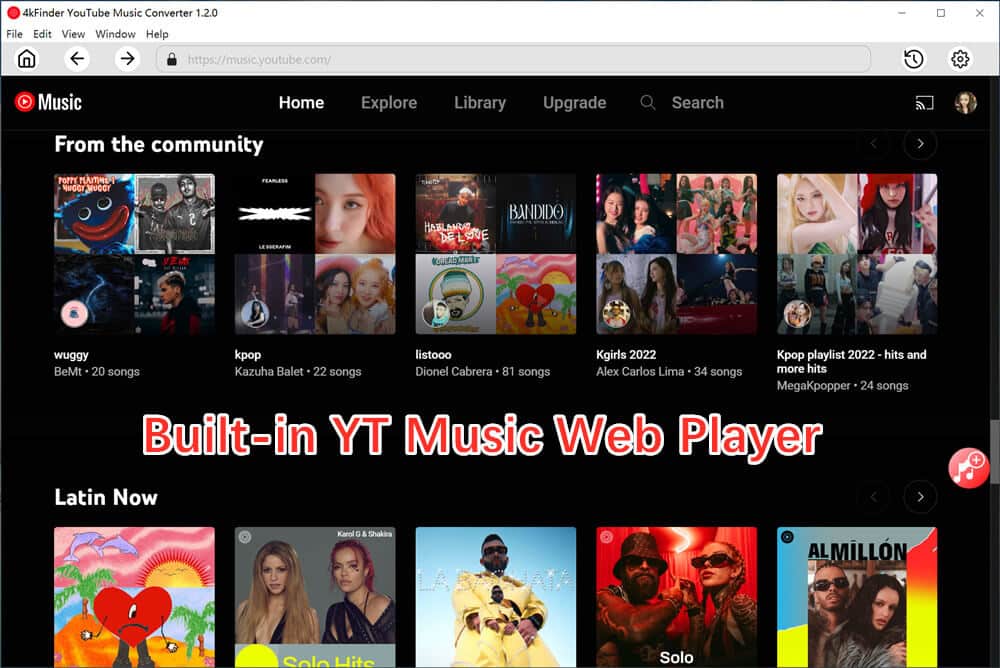
4kFinder comes with a built-in YouTube Music web player, allowing you to search, browse, download, and play music directly without installing any additional apps or YouTube Music subscription. With this tool, you can quickly convert any encrypted songs into DRM-free MP3 files for offline listening on any device.
Part 3. Highlight Features of 4kFinder YouTube Music Converter
#1. Download YouTube Music Without Premium
4kFinder has a built-in YT Music web player, you no need to install the YT Music app, it can help you download songs, playlists, and albums directly. What’s more, It supports to convert music to various formats, including MP3, M4A, FLAC, and WAV, for offline listening. You can freely share those downloaded songs, and transfer them to any devices for offline listening, such as MP3 players, smartphones, and more.
#2. All-in-One YouTube Music Manager, Converter, and Player
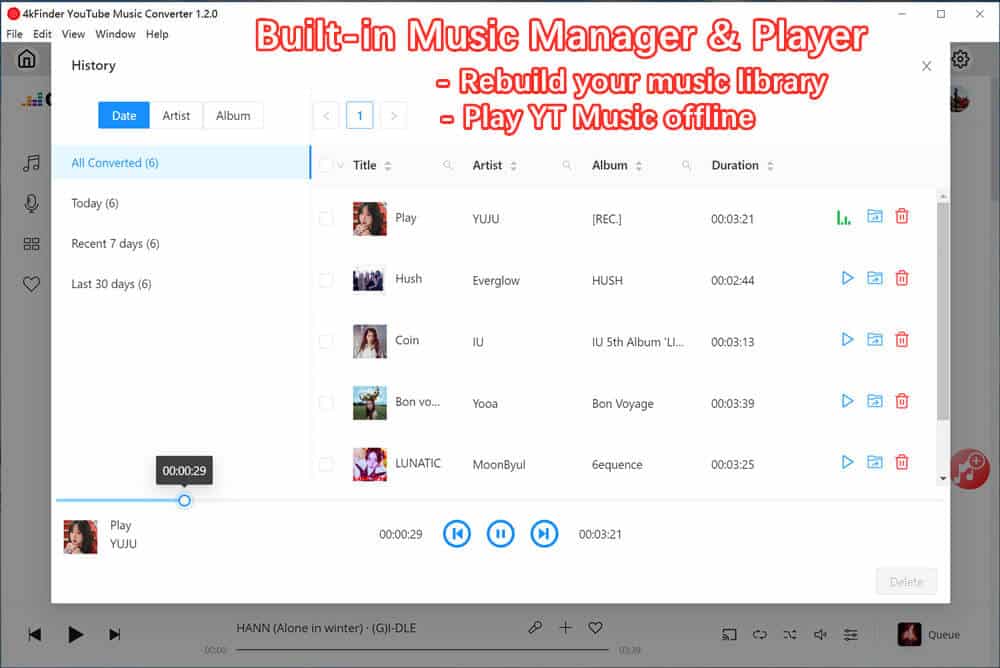
4kFinder YouTube Music Converter comes with a built-in YouTube Music web player, eliminating the need for installing the YouTube Music app. Simply log in to your YouTube Music account to download entire albums or playlists in batches at high speed. The built-in music manager organizes downloaded tracks by artist or album, helping you rebuild your music library, while the integrated music player lets you play songs directly without needing extra apps, saving storage space on your device.
#3. Convert YouTube Music to MP3 and More Formats
4kFinder supports a variety of formats, including MP3, M4A, AAC, WAV, FLAC, and AIFF. Just log in to your account, choose the desired output format, and convert songs or playlists at speeds of up to 10X faster.
#4. High-Quality Downloads With HiFi Audio
The tool supports audio downloads at up to 320kbps and even allows AAC output at 512kbps, ensuring you get the best sound quality for all your tracks.
#5. Super-Fast Conversion Speeds
With speeds up to 10X faster, 4kFinder significantly reduces download time. However, actual speed may vary depending on your network and hardware performance.
#6. Batch Download Feature
Save time and effort by downloading multiple songs, entire playlists, or channels in one go. No need to manually download each track individually.
#7. Preserve Original ID3 Tags and Metadata
The converter retains ID3 tags such as song title, artist, album, genre, and release year, making it easier to manage your downloaded music library.
#8. Wide Compatibility and Multi-Language Support
The software works seamlessly on Windows 7/8/10/11 (64-bit) and macOS 10.11 or later, including M1 and M2 chips. It also supports multiple languages, such as English, Spanish, Chinese, French, Japanese, and German, catering to users worldwide.
Part 4. How to Convert YouTube Music to MP3 with 4kFinder?
Step 1. Launch the Program and Log in to Your YouTube Music Account
Open 4kFinder YouTube Music Converter and click “SIGN IN” to log in to your YouTube Music account. Both Free and Premium accounts are supported.
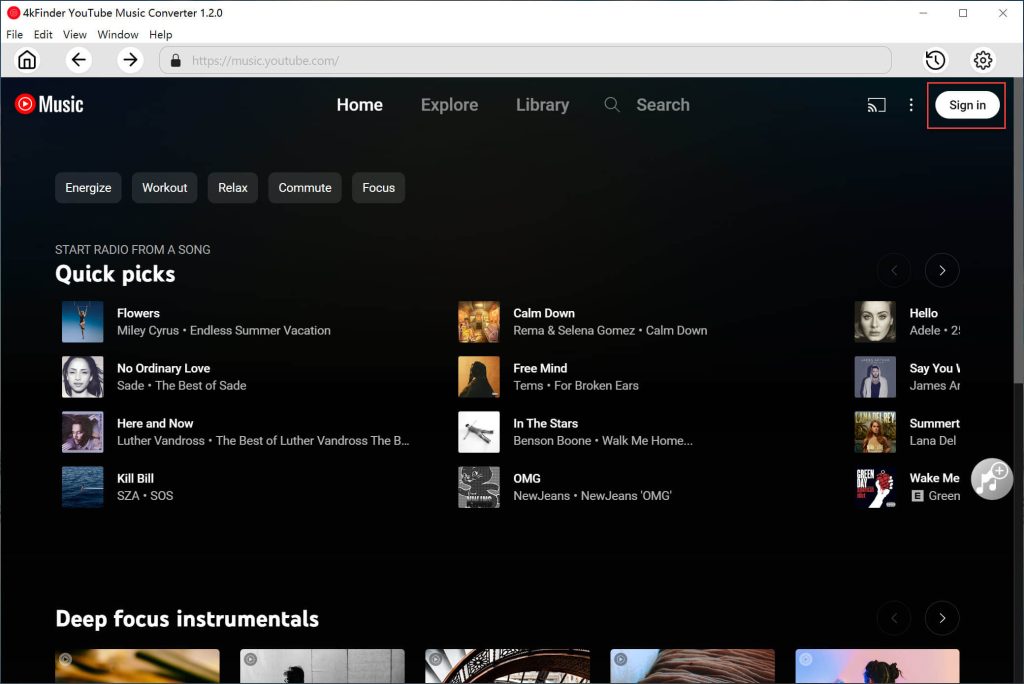
Step 2. Select MP3 as the Output Format
Click the gear icon in the top corner to access the settings. In the pop-up window, change the output format from the default AUTO M4A (256 kbps) to MP3, and set the bit rate to 320kbps if desired.
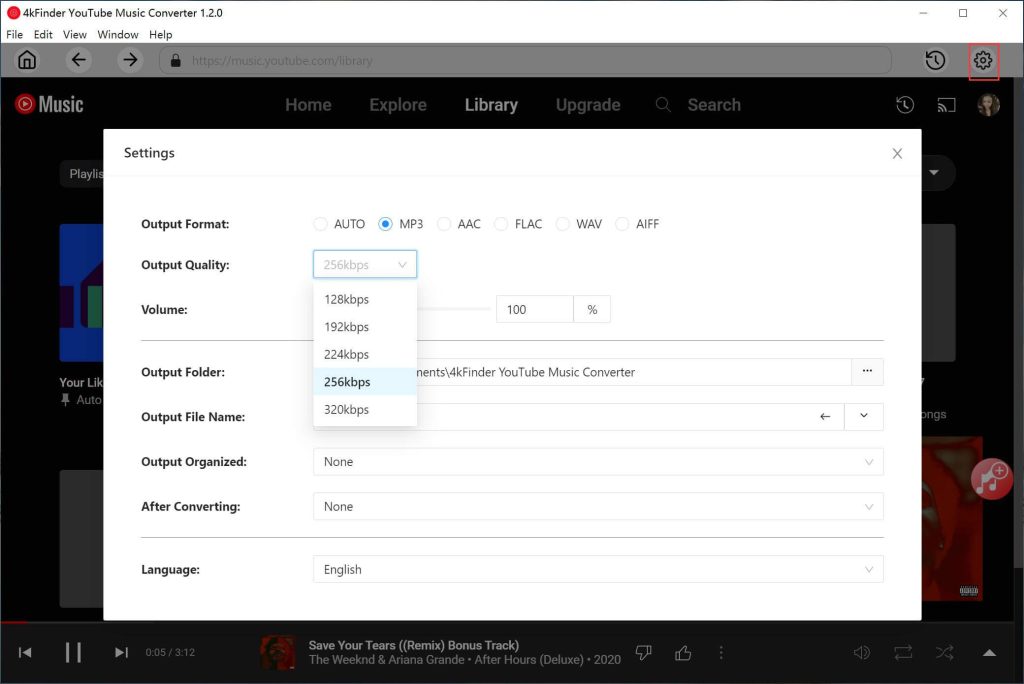
Step 3. Add YouTube Music Songs, Albums, or Playlists
Using the built-in YouTube Music web player, find the song, album, or playlist you want. Click the red “+” icon to add them to the conversion list.
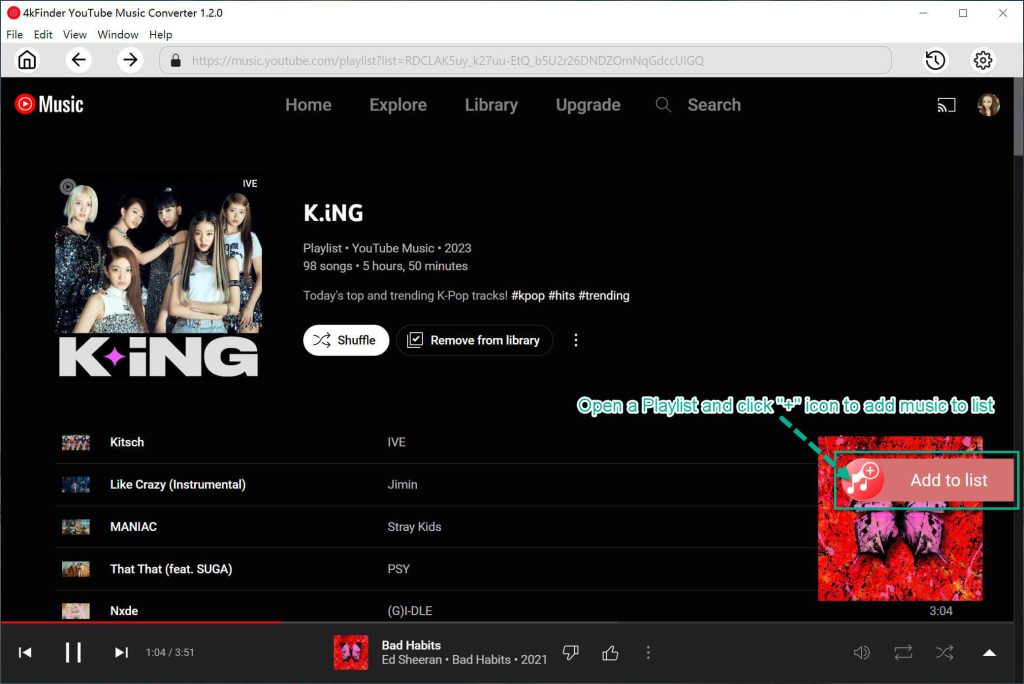
Step 4. Select Songs for Conversion
All songs from the album or playlist will appear in the conversion panel by default. Deselect any tracks you don’t want to download.
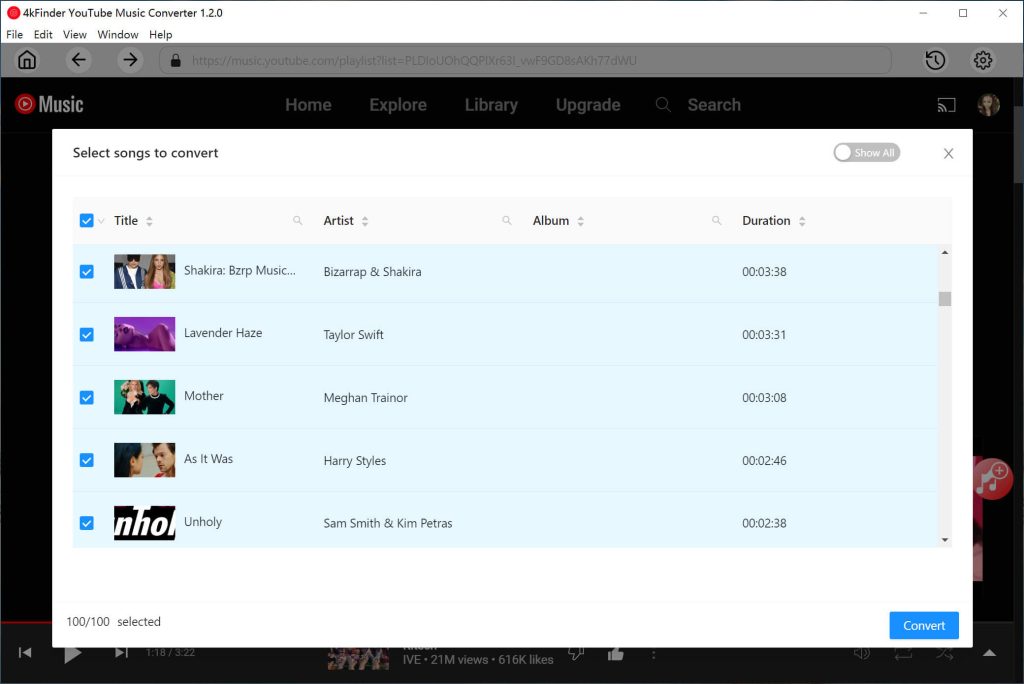
Step 5. Start Converting YouTube Music to MP3
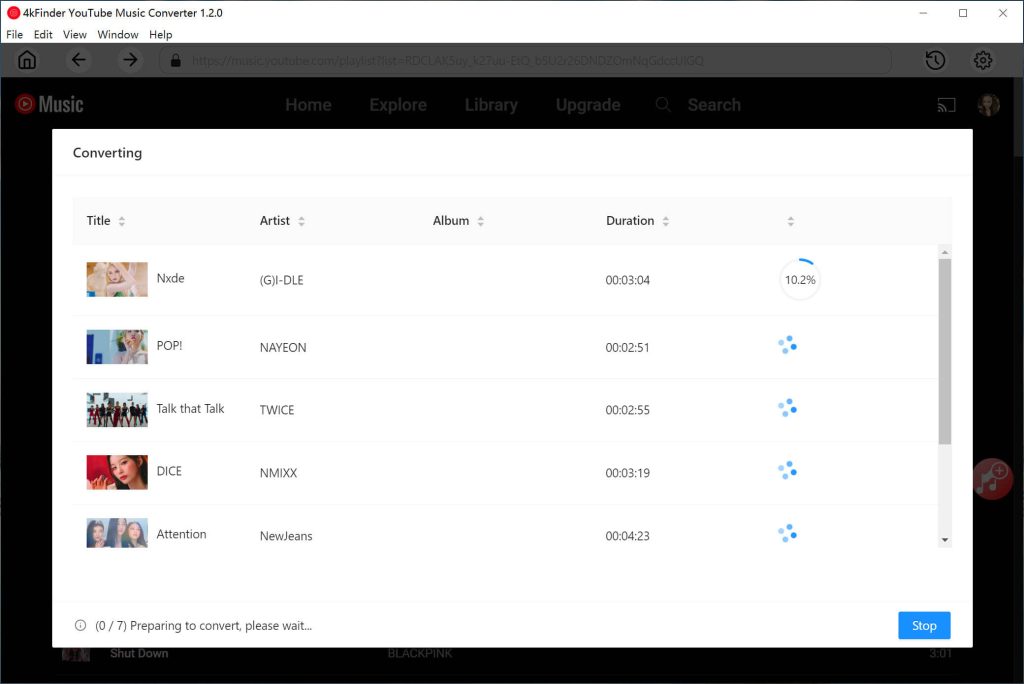
Once you’ve selected the songs, click the “Convert” button to download them from the YouTube Music web player and convert them to MP3 format at 320kbps.
Step 6. View the Converted YouTube Music Songs
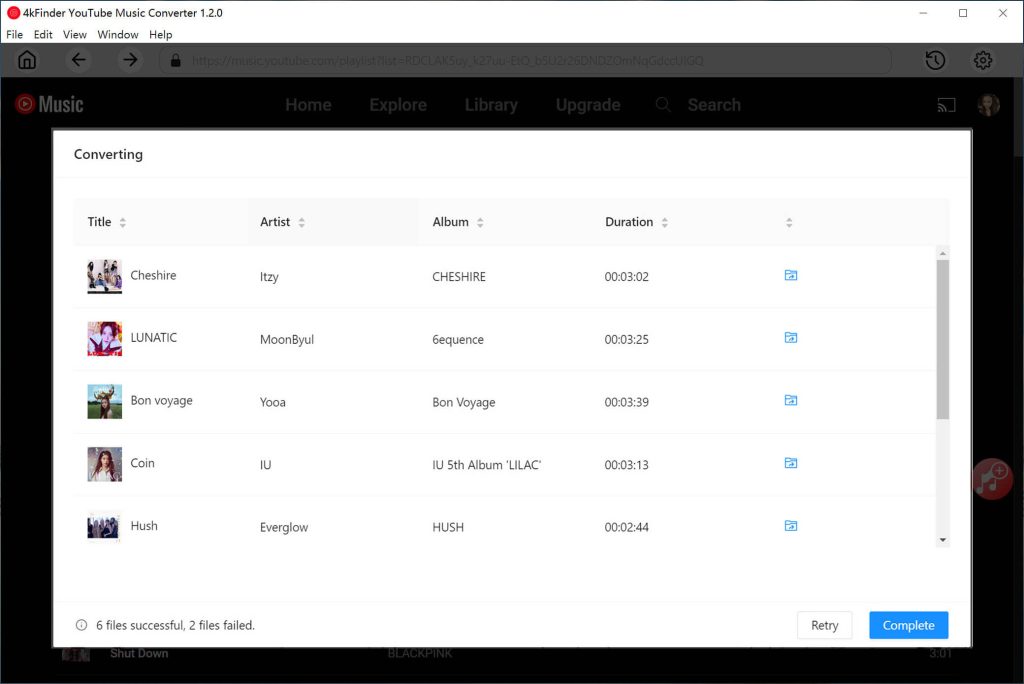
When the conversion is complete, click the “History” icon (a clock symbol) in the top corner. You can view the downloaded songs sorted by Date, Artist, or Album.
Part 5. System Requirement
By now, you should have a clear understanding of how to use 4kFinder YouTube Music Converter to convert YouTube Music to MP3 files. The next step is to ensure your device meets the necessary system requirements for the conversion process. Please check the specifications below:
Windows Operating System: Windows 11/10/8.1/8/7 (32-bit or 64-bit)
Mac Operating System: macOS X 10.9 or later
Processor: 1GHz processor or faster
Monitor: Display with a resolution of 1024×768 pixels or higher
RAM: 512MB or more
Supported Languages: English, French, Japanese, German, Spanish, Simplified Chinese, Traditional Chinese
Part 6. Pricing for 4kFinder YouTube Music Converter
4kFinder YouTube Music Converter offers a range of pricing options to suit different needs, ensuring flexibility for its users. Additionally, a free trial is available for all new users, allowing you to try out the software before committing. Simply click the download button to get started!
Free Trial Version: The trial version allows to convert the first 3 minutes of each songs.
1-Month Subscription: $14.95
1-Year Subscription: $59.95
Single Lifetime License: $89.95
Part 7. Safety of Using 4kFinder YouTube Music Converter
4kFinder YouTube Music Converter is completely safe to use. Unlike many other tools on the market that may carry the risk of viruses or malware, 4kFinder is entirely virus-free and ad-free. You can use it with confidence, knowing that there are no hidden risks. Additionally, using 4kFinder will not put your account at risk of being banned, so you can enjoy the tool worry-free.
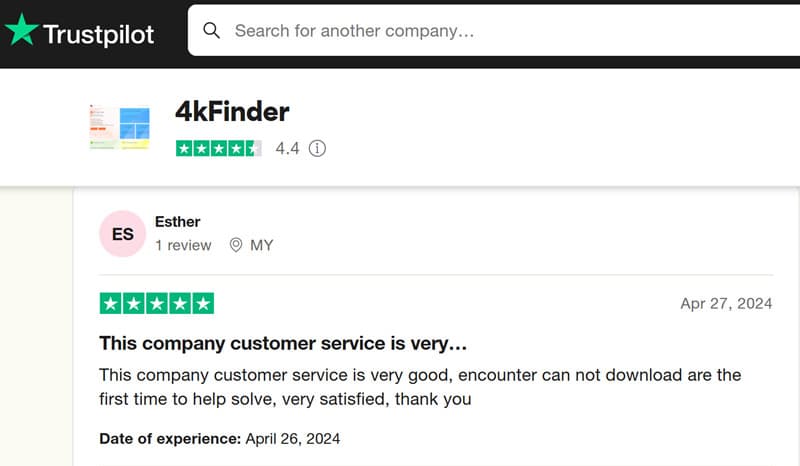
Here, you can view more user’s review of 4kFinder in trustpilot.com
Conclusion
4kFinder YouTube Music Converter makes it quick and easy to convert YouTube Music to MP3, so you can enjoy your favorite songs anywhere. Also you can customize the output quality up to 320kbps for the best listening experience. With 4kFinder, you can download playlists, albums, or songs for offline listening without limits, even without a YouTube Music Premium subscription. Whether at home or on the go, this tool ensures you always have access to your music. Try it today and take control of your YouTube Music library!











